
Accounts & Ledger
Account Class Master
The Account Class Master creates or edits an account class. Account classes allow tracking revenue and expense transactions by categories such as product lines, departments, or projects. For a complete walkthrough of account setup, see the Quasar Guide.
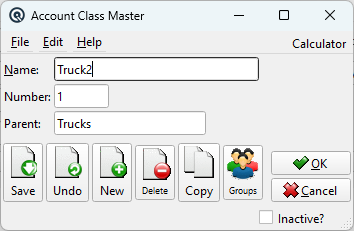
Fields
NameThe account class name (e.g., "Trucks", "Office Supplies", "Consulting"). NumberA unique account class number for identification. ParentThe parent account class. Account classes can be organized in a hierarchy up to three levels deep. For example, "Vehicles" can be a parent of "Trucks" and "Cars". InactiveToggle to deactivate the account class. Inactive classes do not appear in dropdowns or lists. |
Standard Buttons
|
Save — Saves the account class. |
Usage
|
Account classes are assigned to account posting lines in transactions such as General Journals and Cheques. They apply only to revenue and expense accounts — asset and liability accounts do not use account classes. When account classes are in use, reports such as the Profit & Loss and Trial Balance can optionally show a hierarchical breakdown by class under each account. The Account Inquiry screen and Transaction Summary screen also support filtering by account class. |
Related Screens
| Account Class List | General Journal | Cheque Master | Payout |
| Card Adjustment | Item Adjustment | Tender Adjustment | Vendor Invoice |
| Vendor Claim | Account Inquiry |
| Quasar Accounting 7.1 • © Linux Canada Inc. • Table of Contents |