
Inventory
Clone Stocked Item
Clone Stocked copies stocking parameters (minimum, maximum, and order multiple) from the current item to a set of target stores. Use it to quickly stock the item across all stores, a store group, or all stores in a price zone.
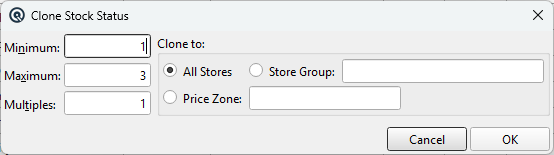
Clone Stocked Dialog
MinimumThe minimum stock level to set on each target store. MaximumThe maximum stock level to set on each target store. MultiplesThe order multiple to set on each target store. Clone ToChoose the destination stores: • All Stores — Copy the stocking values to every active store. Store GroupThe store group to copy to (enabled when Store Group is selected). Price ZoneThe price zone to copy to (enabled when Price Zone is selected). |
Action Buttons
OKApplies the stocking values to the selected stores and closes the dialog. CancelCloses the dialog without making any changes. |
Related Screens
| Item Master | Item List |
| Quasar Accounting 7.1 • © Linux Canada Inc. • Table of Contents |