
Card File & CRM
Task Type Master
The Task Type Master defines the categories of tasks your organization uses. Task types control three critical behaviors: who can see the task (visibility), whether the task tracks billable costs (Work-in-Progress), and whether it links to job assignments. By combining these three settings, you create task types that range from simple personal reminders to full project management with cost tracking and billing. Access from Card File › Task Type List.
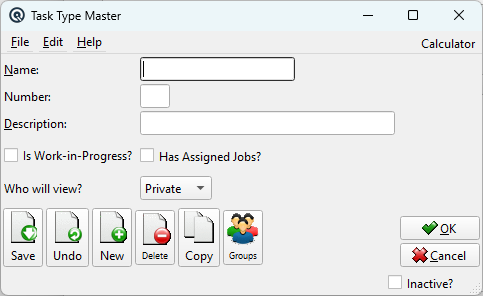
Fields
Is Work-in-Progress?When checked, tasks of this type can accumulate billable costs. See Work-in-Progress section below. Has Assigned Jobs?When checked, tasks of this type can link to job assignments. See Job Assignments section below. NumberUnique identifier (up to 5 characters). Used for sorting and reporting. NameThe task type name (up to 30 characters). This appears in the Task Master's type dropdown and in list screens. Choose names that clearly communicate the purpose: "Personal", "Pick Orders", "Monthly WIP Billing", "Projects". DescriptionA longer explanation of the task type's purpose (up to 50 characters). Visible in list views to help users choose the correct type. Who will view?Private — only the creating employee sees it. Selected — only assigned employees. All — visible to everyone. See Visibility section below. |
Visibility: Who Will View?
|
The View setting controls who can see tasks of this type: • Private — Only the employee who created the task. Best for personal reminders and private to-do items. |
Work-in-Progress (WIP) Tracking
Is Work-in-Progress?When checked, tasks of this type can accumulate billable costs — labour hours, materials, expenses — that are tracked as Work-in-Progress until the customer is invoiced. The Task Master gains a WIP tab where costs are entered and tracked against the task. WIP tracking is essential for: • Professional services — Law firms, consultants, and accountants tracking billable hours per client engagement. |
Job Assignments
Has Assigned Jobs?When checked, tasks of this type can be linked to one or more jobs from the Job Master. The Task Master gains a Jobs tab where specific job assignments are attached to the task. Job assignments are useful for: • Field service — A technician is assigned three repair jobs for the day, each linked to a different customer location. |
The Power of Combinations
|
The real power of task types comes from combining View, WIP, and Jobs: • Personal (Private, No WIP, No Jobs) — Simple to-do list visible only to you. |
Industry Examples
|
Retail Store — Use "Personal" for manager to-do lists, "Pick Orders" for online order fulfillment, and "General Message" for staff announcements. No WIP or Jobs needed. Accounting Firm — Use "Monthly WIP Billing" for each client engagement. Staff log hours to the task throughout the month; the billing partner reviews accumulated WIP and generates invoices at month-end. HVAC / Plumbing Contractor — Use "Assigned Jobs" for daily service calls (simple dispatch), and "Projects" for larger installations where material and labour costs must be tracked and billed against a contract. Co-operative / Wholesale — Use "Pick Orders" assigned to warehouse staff to manage customer order fulfillment. Use "Accounting" for month-end reconciliation tasks assigned to the bookkeeper. |