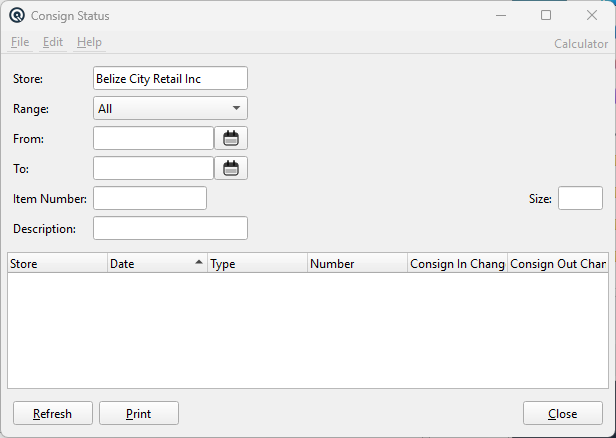
The Consignment Status screen shows all consignment activity for a single item. It queries across all six transaction types (Consign In, Consign In Return, Consign Out, Consign Out Return, Vendor Invoices from consignment, Customer Invoices from consignment) and displays the net consignment-in and consignment-out changes per transaction. Double-click any row to open the originating transaction. Access from the Consignments panel › Consignment Status report link.
Optional. When set, restricts results to transactions tied to this specific consignment number. Clear the field and click Refresh to see all transactions. When launched from a Consignment In or Out master via the Consign Status button, this is automatically pre-filled.
Results Columns
Column
Description
Store
Store name for the transaction.
Date
Posting date (sortable, default sort column).
Type
Transaction type: Consign In, CIn Return, Consign Out, COut Return, Receive (vendor invoice from consignment), Invoice (customer invoice from consignment).
Number
Transaction document number.
Consign In Change
Net change to consignment-in quantity. Positive = received from vendor, negative = returned to vendor or invoiced.
Consign Out Change
Net change to consignment-out quantity. Positive = sent to customer, negative = returned by customer or invoiced.
All quantities are normalized to the item's selling size for consistent comparison.
Drill-Down
Double-click any row to open the originating transaction in its master screen: