Quasar Docs

More Topics

Fleet Fuel Report

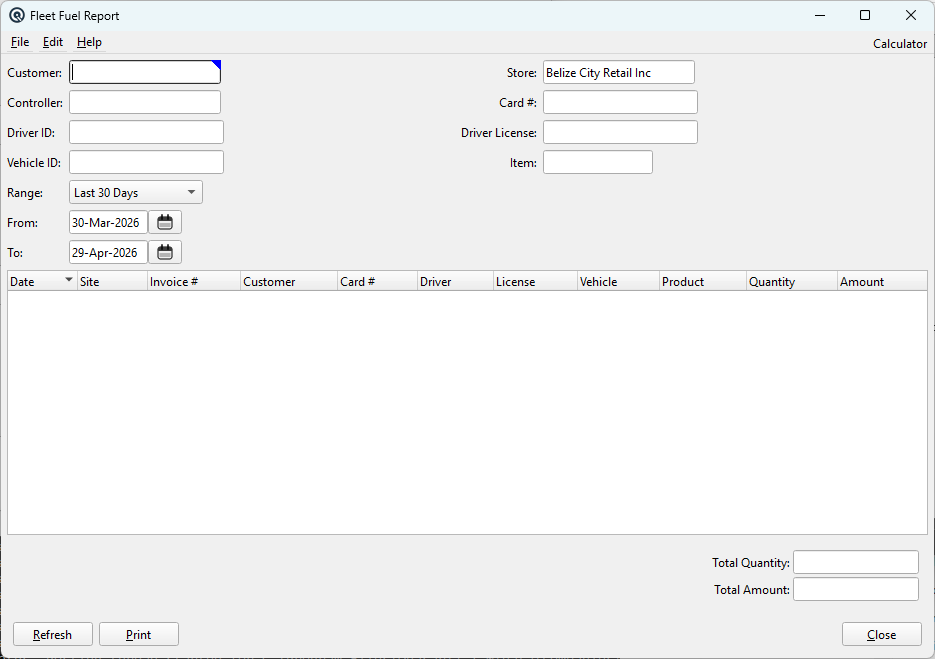
The Fleet Fuel Report tracks all fuel dispensing transactions by customer, vehicle, driver, fleet card, and product. It queries the fleet_transaction table joined to posted invoices, providing a comprehensive audit trail of fuel purchases with quantity and dollar totals. This report is security-gated — access requires the “View” permission. Feature-gated to feat_fuel. Access from Setup › Sales › Fleet Fuel Report.

Filter Fields

All filters are optional except: a From date is required when no customer is selected.

FieldDescription
CustomerFilter by customer. Uses the standard customer lookup.
StoreFilter by store. Defaults to the current store.
ControllerFilter by fuel controller (site). Matches against the controller_id in fleet_transaction.
Card #Free-text search for fleet card number. Case-insensitive partial match.
Driver IDFree-text search for driver identifier. Case-insensitive partial match.
Driver LicenseFree-text search for driver license number. Matches against both the fleet_transaction record and the customer_fleet card record.
Vehicle IDFree-text search for vehicle identifier. Case-insensitive partial match.
ItemFilter by fuel product item. Matches against product codes via the item_plu table.
RangePre-set date range. Defaults to “Last 30 Days”.
FromStart date filter. Required when no customer is selected.
ToEnd date filter.

Report Columns

ColumnDescription
DateTransaction post date.
SiteSite label or controller ID where the fuel was dispensed.
Invoice #Quasar invoice number for the fuel transaction.
CustomerCustomer name from the invoice.
Card #Fleet card number used at the pump.
DriverDriver ID entered at the pump.
LicenseDriver license number. Pulled from customer_fleet if available, otherwise from the transaction record.
VehicleVehicle ID entered at the pump.
ProductFuel product name (e.g., Regular, Diesel).
QuantityVolume dispensed.
AmountDollar amount of the fuel purchase.

Double-click any row to open the source invoice for editing.

Transaction List

The list shows all fuel transactions matching the selected filters.

Totals Summary

FieldDescription
Total QuantitySum of all fuel volumes dispensed in the filtered results.
Total AmountSum of all dollar amounts in the filtered results.

Actions

ButtonDescription
RefreshRe-queries the database with the current filter settings.
PrintGenerates a printable report with all title lines (customer, store, controller, filters, date range) and quantity/amount totals in the footer.
CloseCloses the report window.

Data Source

The report queries from fleet_transaction joined to gltx (for invoice details), customer (for customer name), and customer_fleet (for driver license lookup from card number). Only posted, active transactions are included. Results are ordered by transaction date descending.

Related Screens

Controller List Fuel Controller Master Tank Status Report

Quasar Accounting 7.1 • © Linux Canada Inc. • Table of Contents