
Setup & Configuration
Tax Master
The Tax Master creates or edits a tax code. Taxes are applied to items through subdepartments and can be collected from customers or paid to vendors. A tax can be an individual rate or a group of other taxes. Access from Setup › System › Taxes, then click New or Edit.
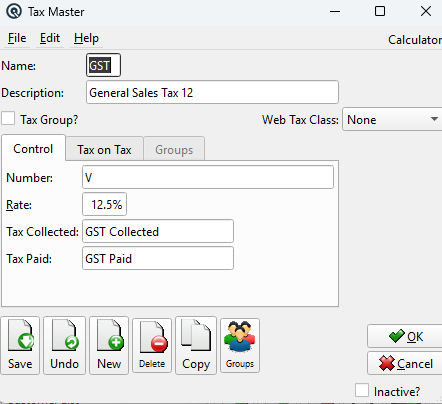
General
NameThe short tax code name (max 4 characters, e.g., "GST", "PST", "VAT", "VNE"). DescriptionA longer description of the tax (e.g., "Goods and Services Tax"). Tax Group?Check this box to make this tax a group tax — a combination of individual taxes. When checked, the Control and Tax on Tax tabs are disabled and the Groups tab becomes active. When unchecked (individual tax), the Control and Tax on Tax tabs are active and Groups is disabled. Tax Group?Same as above. When checked, this tax is a group tax and the Groups tab is used to select component taxes. Web Tax ClassClassification for e-commerce integrations. Options: None, Taxable, Reduced Tax, Downloadable, Zero Rated. |
Control Tab
Available when Tax Group is unchecked (individual tax).
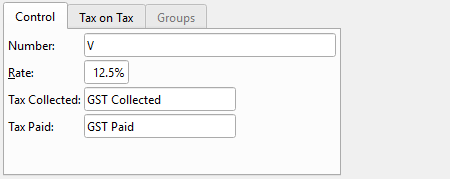
NumberA unique tax registration number for this tax authority. RateThe tax rate as a percentage (e.g., 5.00 for 5%). Tax CollectedThe GL liability account where taxes collected from customers are posted (tax payable to the government). Tax PaidThe GL asset account where taxes paid on purchases are posted (input tax credits recoverable from the government). |
Tax on Tax Tab
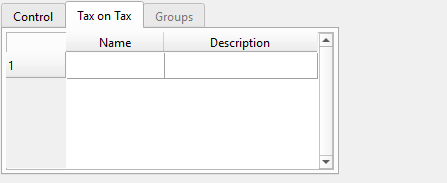
Available when Tax Group is unchecked (individual tax).
|
Lists other taxes whose amounts should be included in the taxable base before this tax is calculated. This implements cascading tax (tax-on-tax) where one tax is computed on a total that already includes another tax. Tax on Tax TableExample: In Quebec, QST is calculated on the selling price plus GST. You would add "GST" to the QST tax-on-tax list so that QST is computed on (price + GST amount). NameSelect a tax code whose amount should be included in this tax's base. DescriptionAuto-populated from the selected tax. |
Groups Tab
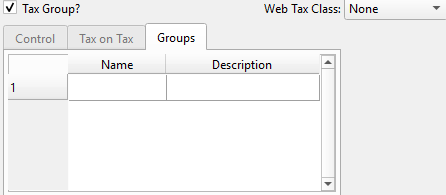
Available when Tax Group is checked.
|
When a tax is marked as a group, it does not have its own rate or GL accounts. Instead, it is a container for individual component taxes that are all applied together. Example: A "HST" group tax could contain "GST" (5%) and "PST" (8%) as component taxes. Assigning "HST" to a subdepartment applies both taxes automatically. Groups TableNameSelect a component tax code to include in this group. DescriptionAuto-populated from the selected tax. |
Toolbar Actions
Save / Undo / New / Delete / CopyStandard master screen actions. OK / CancelSave and close, or discard and close. Inactive?Toggle to deactivate the tax code. |