
Accounts & Ledger
Find Transaction
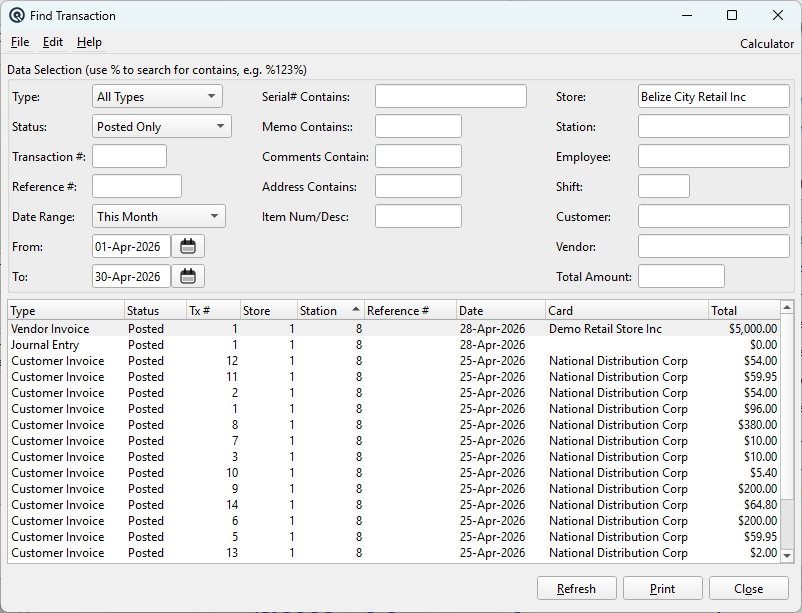
The Find Transaction screen is Quasar's most powerful search tool for locating transactions across the entire ledger. It combines type selection, status filtering, text searches, date ranges, and location/employee filters to quickly locate any transaction in the system. Double-click a result to open it for editing. Access from Ledger › Find Tx.
Tip: Use % as a wildcard in text fields. For example, %123% finds any value containing "123". All text searches are case-insensitive.
Transaction Type & Status
TypeFilter results to a specific transaction type, or select All Types to search everything. Available types depend on your security permissions and enabled features. Types include: Item Adjustment, Item Transfer, Cheque, Journal Entry, Ledger Transfer, Invoice, Customer Payment, Vendor Invoice, Payout, Customer Return, Tender Adjustment, Tender Transfer, Vendor Claim, Customer Withdraw, Card Adjustment, and Card Transfer. When a specific type is selected, the Transaction # label changes to match (e.g. "Invoice #", "Receipt #", "Adjustment #") and the Customer/Vendor lookups are enabled or disabled as appropriate for that type. StatusFilter by transaction status: Posted Only (default) shows live transactions, Voided Only shows deleted transactions, Suspended Only shows incomplete POS transactions, Voided or Suspended shows both, and All Transactions shows everything regardless of status. |
Number & Date Filters
Transaction #Search by full or partial transaction number. Supports % wildcards for partial matching. Case-insensitive. Reference #Search by the reference number field (e.g. cheque number, PO number, external reference). Supports % wildcards. Case-insensitive. Date RangeRestrict the list to a specific date period. The dropdown offers these presets: • All — No date filter (shows everything) Date field shortcuts: Type a letter in any date field for quick entry: d = today, y = yesterday, t = tomorrow, w = first day of week, k = end of last week, m = first of month, eom = end of month, l = first of last month, h = end of last month, a = beginning of year, z = end of year, + / – = next / previous day. From / ToFilter results to transactions posted on or after the From date and on or before the To date. Either field can be left blank for an open-ended range. |
Text Search Filters
Serial# ContainsFind transactions that involve a specific serial number. Searches both the serial tracking table and invoice item serial fields. Only visible when the Serial Numbers feature is enabled. Memo ContainsSearch within transaction memos. Matches against both the main transaction memo and individual account line memos. Multiple words narrow the search (all words must appear). Comments ContainSearch within transaction comments on Invoices, Vendor Invoices, Customer Returns, and Vendor Claims. Multiple words narrow the search. Address ContainsSearch within customer address fields stored on Invoices and Customer Returns. Useful for finding transactions by delivery address or ship-to location. Item Num/DescSearch for transactions containing a specific item by its number or description. Searches the item PLU table for matches. Multiple words narrow the search (all words must match within the combined number and description). |
Location & People Filters
StoreFilter to transactions from a specific store. Defaults to the current store. Changing the store also resets the Station and Employee filters to match available options. StationFilter to transactions from a specific POS station. The station list is filtered by the selected store. EmployeeFilter to transactions created by a specific employee. The employee list is filtered by the selected store. ShiftFilter to transactions from a specific cashier shift. CustomerFilter to transactions for a specific customer. Disabled when the selected transaction type does not involve customers (e.g. Item Adjustment, Payout). VendorFilter to transactions for a specific vendor. Only visible when the Purchasing feature is enabled. Disabled when the selected type does not involve vendors. Total AmountFilter to transactions with an exact total amount. Enter the precise dollar value to match. |
Results List
Results ListThe list displays all transactions matching the selected filters. ColumnsResults display: Type (transaction type name), Status (Posted, Voided, or Suspended), Tx # (transaction number), Store, Station, Reference #, Date, Card (customer or vendor name), and Total (transaction amount). Click any column header to sort. Double-Click / EnterOpens the selected transaction in its native editor (e.g. Invoice Master, Cheque Master, Journal Entry). Right-Click MenuProvides Edit (open transaction) and Print (print the individual transaction document) options. |
Actions
RefreshExecute the search with the current filter criteria. Also triggered by pressing Enter in most filter fields. Generate a printable report of all currently displayed search results, including all filter titles in the report header. CloseClose the Find Transaction window. |
Related Screens
| Journal | Inquiry | Invoice List | Receipt List |
| Quasar Accounting 7.1 • © Linux Canada Inc. • Table of Contents |