
Assets & Depreciation
Depreciation Master
The Depreciation Master creates or edits a depreciation method. These are assigned to Asset Types (and through them to individual assets) to control how asset value is reduced over the asset's useful life. For a complete walkthrough of asset and depreciation setup, see the Quasar Guide — Assets and Depreciation. Access from Assets › Depreciations › New/Edit.
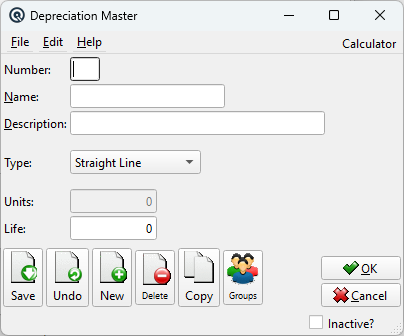
Fields
NumberUnique method number (up to 5 characters). NameMethod name (up to 30 characters). Example: 5yr Straight Line. DescriptionExtended description (up to 50 characters). TypeCalculation method (dropdown): UnitsTotal production units over the asset's useful life. Only enabled when Type is Units of Production; disabled and ignored for all other types. LifeUseful life of the asset in years. Used by Straight Line and Declining Balance calculations. |
Type Behavior
|
Changing the Type dropdown dynamically enables/disables the Units field. Units of Production is the only type that requires a units value; for all other types, the Units field is locked at zero. |
Toolbar
Save / Undo / New / Delete / Copy / GroupsStandard master screen toolbar actions. OK / CancelSave and close, or discard and close. Inactive?Toggle to deactivate the record. |
Related Screens
| Depreciation List | Asset Type Master | Asset Master |
| Quasar Accounting 7.1 • © Linux Canada Inc. • Table of Contents |