
More Topics
CRM Contact Master
The CRM Contact Master creates or edits a CRM contact record.
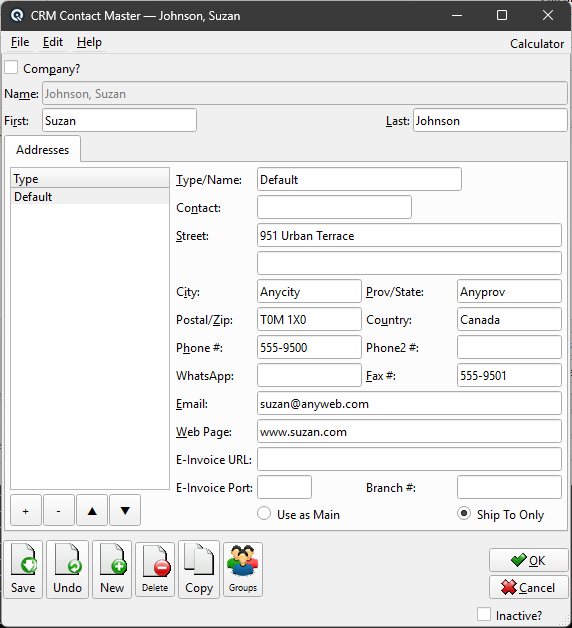
General
Company?Check if this contact is a company. Uncheck for an individual person. Company NameWhen Company is checked, enter the company name. First NameWhen Company is unchecked, enter the person’s first name. Last NameWhen Company is unchecked, enter the person’s last name. InactiveMarks the contact as inactive. Inactive contacts are hidden from lists by default. |
Addresses Tab
|
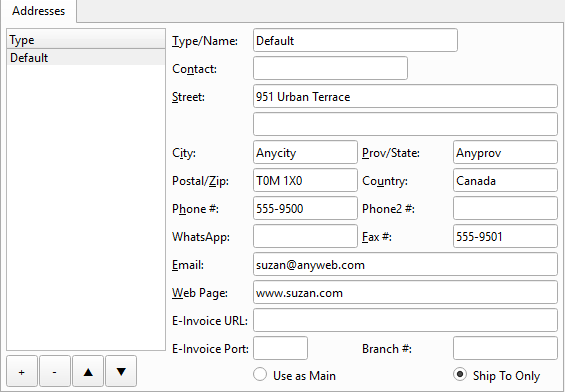
Multiple addresses with contact details. Use Add/Edit/Delete and Up/Down buttons to manage entries. Each address includes: Address ListList of addresses for this contact. Select an address to edit its details. Add AddressAdd a new address. Delete AddressRemove the selected address. Move UpMove the selected address up in the list. Move DownMove the selected address down in the list. Type/NameA label identifying the address (e.g., "Main", "Mailing"). Must be unique per contact. ContactContact person at this address. StreetStreet address. A second line is available for suite, unit, or building information. Street 2Second line of the street address. CityCity name. Prov/StateProvince, state, or region. Postal/ZipPostal code or ZIP code. CountryCountry name. Phone #Primary phone number. Phone2 #Secondary phone number. Fax #Fax number. WhatsApp phone number for business messaging. Email address. Web PageWebsite URL. E-Invoice URLURL for receiving electronic invoices at this address. E-Invoice PortPort for electronic invoice delivery. Branch #Branch or location number. Use as MainMark this address as the main address. Ship To OnlyMark this address as ship-to only. |
Standard Buttons
SaveSaves the CRM contact. UndoReverts changes since the last save. NewOpens a blank contact. DeleteDeletes the contact. CopyDuplicates the contact. GroupsAssign the contact to security/data groups. OKSaves and closes the screen. CancelCloses without saving changes. |
Related Screens
| CRM Contact List | Send Email |
| Quasar Accounting 7.1 • © Linux Canada Inc. • Table of Contents |