
Customers & Sales
Customer Type Master
The Customer Type Master creates or edits a customer classification. When a customer is assigned a type, or when their type is changed, these values become the defaults for that customer's record. Individual customers can override any of these defaults on their own Customer Master. Access from Sales › Customer Type.
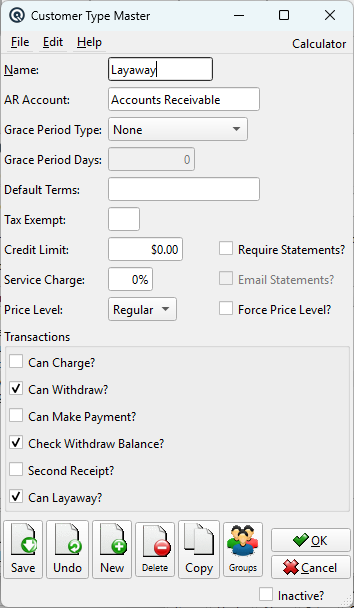
Fields
NameType name (up to 20 characters). Used throughout Quasar in customer lists, reports, and filters. Examples: “Retail”, “Wholesale”, “Government”, “Layaway Eligible”. AR AccountThe default Accounts Receivable GL account for customers of this type. When a customer is assigned this type, their AR account is set to this value. All invoices, payments, and returns for the customer will post to this account. You can set up separate AR accounts per type for reporting segmentation (e.g., a different AR account for wholesale vs. retail customers). Grace Period TypeControls how the grace period is calculated before service charges are applied to overdue balances. This field and Terms are mutually exclusive — selecting a grace type disables Terms, and vice versa: None — No grace period. Service charges are calculated based on the payment Terms instead (e.g., Net 30). The Terms field is enabled. Grace Period DaysNumber of days in the grace period (only enabled when Grace Period Type is not “None”). Balances older than this many days will be subject to service charges when the Service Charges routine is run. Default TermsThe default payment Terms for customers of this type (e.g., “Net 30”, “2/10 Net 30”). Sets the due date calculation on invoices. Only enabled when Grace Period Type is “None”. Tax ExemptDefault tax exemption code for this customer type. When a customer of this type is selected on an invoice, this exemption is applied automatically, zeroing out the corresponding tax lines. Leave blank for fully taxable customers. Credit LimitThe default maximum credit balance allowed for customers of this type. When Check Withdraw Balance is enabled, the POS will warn or block transactions that would exceed this limit. Set to $0.00 for no limit. |
Service Charges & Statements
Service Charge RateThe annual percentage rate used to calculate service charges on overdue balances. For example, 18% means 1.5% per month is applied to past-due amounts when the Service Charges routine is run. Set to 0% to exempt this customer type from service charges. Require Statements?When checked, customers of this type are included in the Print Statements batch. Unchecked types are skipped during batch printing. Email Statements?When checked (and Require Statements is also checked), statements are emailed to the customer's email address instead of being printed. This checkbox is disabled until Require Statements is enabled. |
Pricing
Price LevelThe default pricing tier for customers of this type. Quasar supports five price levels: Regular — Standard retail price. Force Price Level?When checked, the customer's price level cannot be overridden at the point of sale — the clerk cannot change it to a different level. Only enabled when a level other than Regular is selected. This is useful for wholesale customers who must always receive their contracted pricing. |
Transaction Permissions
|
These checkboxes control which POS and back-office transactions are permitted for customers of this type. Each flag defaults to the customer's individual record when the type is assigned. Can Charge?Allows customers to purchase on account (charge to AR). When unchecked, the customer must pay in full at the point of sale and cannot have invoices posted to their account. Can Withdraw?Allows customers to withdraw credit balances as cash or another tender via the Customer Withdraw screen. Typically enabled for customers with prepaid or credit-balance accounts. Can Make Payment?Allows customers to make payments against their outstanding AR balance via the Customer Payment (Receipt) screen. Check Withdraw Balance?When checked, the system verifies the customer has sufficient credit balance before allowing a withdrawal. Prevents withdrawals that would exceed the available credit. Second Receipt?When checked, the POS automatically prints a second copy of the receipt for charge transactions. Useful for customers who need a store copy and a customer copy for their records. Can Layaway?When checked, customers of this type are eligible for Layaway transactions. This default is inherited by each customer assigned this type. When creating a layaway-type Sales Order, only customers with this flag enabled will appear in the customer lookup. Individual customers can override this flag on their own Customer Master Control tab. |
How Defaults Flow to Customers
|
When a customer's type is changed on the Customer Master, all of the type's defaults are copied to the customer's record — AR account, terms, tax exempt, credit limit, service charge rate, price level, statement flags, and all transaction permission flags. The customer can then override any of these individually. Changing the type on the Customer Type Master does not retroactively update existing customers; it only affects customers assigned this type going forward. |
Related Screens
| Customer Type List | Customer Master | Layaway | Service Charges |
| Quasar Accounting 7.1 • © Linux Canada Inc. • Table of Contents |