
Cheques & Payments
Payout
The Payout screen creates or edits a POS payout transaction (removing cash from the till for a business expense).
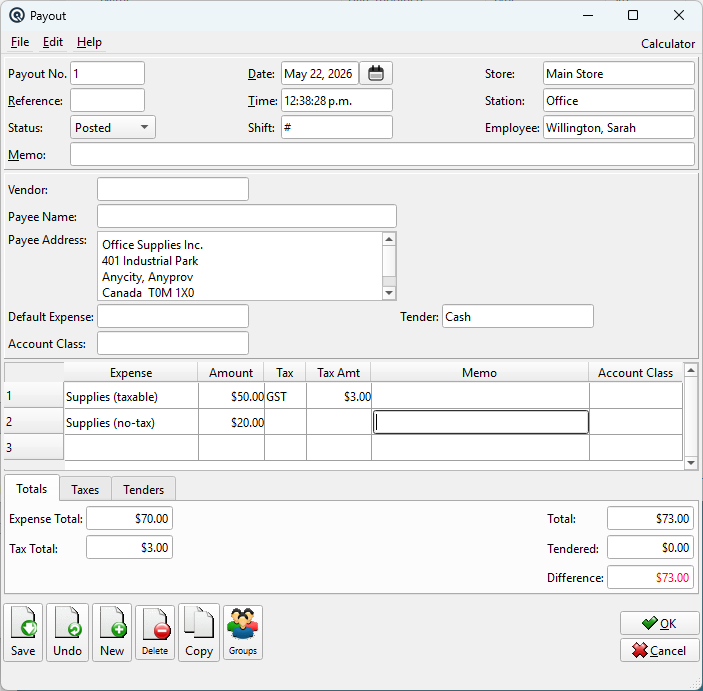
Header Fields
Payout No.Payout number. Enter # for auto-numbering. ReferenceReference string for cross-referencing or notes (optional). StatusTransaction status. Controls posting and visibility in lists. DatePosting date for the transaction. Defaults to today. TimeTime of posting. Auto-filled from the system clock. Work DateWork date for the transaction (may differ from posting date). ShiftShift assignment for labour or shift-based reporting. StoreStore where the transaction is posted. Defaults to current store. StationWorkstation or terminal where the transaction was entered. EmployeeEmployee who created or is responsible for the transaction. MemoFree-form memo or notes attached to the transaction. |
General
Payee NameName of the payout recipient. Payee AddressMailing address of the payout recipient. Default ExpenseExpense category (from Expense setup). Account ClassDefault account class applied to all expense lines that do not have their own class set. Only visible when the Account Classes feature is enabled. TenderDefault tender being paid out (usually Cash). VendorOptional vendor associated with this payout. InactiveMarks the payout as inactive. Expenses TableColumns: Expense, Amount, Tax, Tax Amt, Account Class, Memo. Enter one or more expense lines. The Account Class column overrides the default class for individual lines. If the expense posts to a balance sheet account, the class is silently ignored. |
Totals Tab

Expense TotalSum of all expense line amounts. Tax TotalSum of all tax amounts. TotalCombined expense + tax total. TenderedTotal amount tendered. DifferenceDifference between total and tendered amounts. Must be zero to save. |
Taxes Tab

Taxes TableRead-only breakdown of taxes calculated on the payout expenses. Tax / NameTax code and name. TaxableTaxable amount subject to this tax. Tax AmtCalculated tax amount. |
Tenders Tab

Tenders TableEnter the tender(s) used for the payout. TenderSelect the payment tender. AmountAmount in the tender’s currency. RateConversion rate (for foreign currency tenders). TotalEquivalent amount in base currency. |
Standard Buttons
SaveSaves the payout. UndoReverts changes since the last save. NewOpens a blank payout. DeleteDeletes the payout. CopyDuplicates the payout. GroupsAssign the payout to security/data groups. OKSaves and closes the screen. CancelCloses without saving changes. |
Related Screens
| Payout List | Expense Master |
| Quasar Accounting 7.1 • © Linux Canada Inc. • Table of Contents |