
Assets & Depreciation
Depreciate Assets
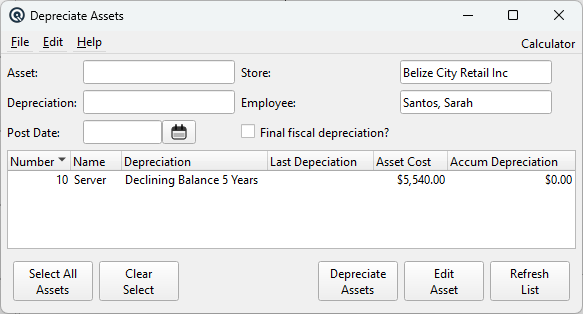
The Depreciate Assets screen runs the periodic depreciation calculation for fixed assets and automatically posts journal entries to the General Ledger. It supports Straight Line and Declining Balance methods, multi-select batch processing, and fiscal year-end final depreciation. For a complete walkthrough, see the Quasar Guide — Assets and Depreciation. Access from Assets › Depreciate Assets.
Filter Fields
AssetOptional filter. Select a specific asset to depreciate only that asset. Leave blank to show all active assets. DepreciationOptional filter. Select a depreciation method to show only assets using that method (e.g. Straight Line, Declining Balance). Leave blank to show all methods. StoreStore that owns the assets. Defaults to the current store. Changing the store clears the employee and refreshes the asset list. Required before posting. EmployeeEmployee posting the depreciation entries. Defaults to the current user. Required before posting. Filtered to employees belonging to the selected store. Post DateThe date for the journal entries. Depreciation is calculated from each asset's last depreciation date (or purchase date if never depreciated) through this date. Must be after the asset's last depreciation date. Required before posting. Final Fiscal Depreciation?Checkbox for fiscal year-end processing. When checked, each asset's Start Amount is set to its accumulated depreciation after posting. This establishes the new cost basis for Declining Balance calculations in the next fiscal year, preventing double-counting of prior-year depreciation. |
Asset List
Displays all active assets matching the filter criteria. Supports multi-select — hold Ctrl or Shift to select multiple assets for batch depreciation.
|
Number — Asset number. |
Depreciation Methods
Straight LineDivides the asset cost evenly over its useful life. The daily rate is Cost ÷ (Life × 365), multiplied by the number of days since last depreciation. Produces consistent, equal depreciation amounts each period. Declining BalanceApplies a double-declining rate to the remaining book value. The formula is (2 ÷ Life) × Start Amount × (Days ÷ 365). Produces larger depreciation in early years that decreases over time. The Start Amount resets when Final Fiscal Depreciation? is checked at year-end. Units of ProductionRequires manual calculation. If an asset uses this method, the system displays an error directing the user to calculate and post the depreciation manually via the General Journal. NoneAssets with no depreciation method are silently skipped during processing. |
Action Buttons
Select All AssetsSelects every asset in the list for batch depreciation. Clear SelectDeselects all assets in the list. Depreciate AssetsProcesses depreciation for all selected assets. For each selected asset, the system:
Edit AssetOpens the Asset Master for the selected asset. Double-clicking a row also opens it. Refresh ListReloads the asset list with current data from the database, applying any filter changes. |
Related Screens
| Asset List | Asset Master | Asset Type | Depreciation | General Journal |
| Quasar Accounting 7.1 • © Linux Canada Inc. • Table of Contents |