
Consignments
Consignment Out List
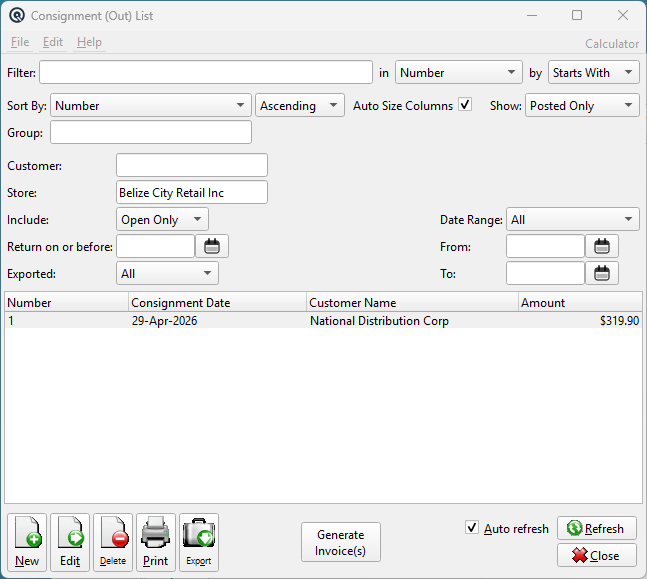
The Consignment Out List displays all goods sent on consignment to customers. Use the filters to narrow results by customer, store, status, date range, open/closed state, and export status. Features a Generate Invoice(s) button to batch-create customer invoices for sold consignment items. Access from Consignments › Consignment Out List.
Filters
FilterQuick-search the displayed list. Type text to instantly filter rows by matching against the selected column. Use the in dropdown to choose which column to search, and the by dropdown to switch between Starts With, Contains, or Exact Match. Find ColumnChoose the column to search within. Find MethodSwitch between Starts With, Contains, or Exact Match. Sort ColumnChoose the column used to sort the list. Sort MethodSwitch between Ascending and Descending order. Auto Size ColumnsWhen checked, columns automatically resize to fit their contents. When unchecked, column widths are saved between sessions. StatusPosted Only, Voided Only, Suspended Only, or All. CustomerFilter to a specific customer (lookup). StoreFilter by store (defaults to current store). IncludeOpen Only, Closed Only, or All consignments. Return on or beforeShow consignments with a return date on or before this date (or with no return date). ExportedAll, Exported Only, or Not Exported. Date RangeChoose a preset range or leave on Manual. FromStart of the consignment date range. ToEnd of the consignment date range. |
Results Columns
|
Default columns: Number, Consignment Date, Customer Name, Amount. Additional columns available via column chooser:
|
Generate Invoice(s)
|
Creates Customer Invoices for all visible, open consignments with sold items. If consignments span multiple customers, prompts for confirmation before generating one invoice per customer. |
Standard List Actions
|
New — Opens a blank Consignment Out. |
Related Screens
| Consignment Out | Consignment Out Return List | Consignment Status |
| Quasar Accounting 7.1 • © Linux Canada Inc. • Table of Contents |