
Consignments
Consignment Out Return
The Consignment Out Return screen records goods returned by a customer from consignment. This brings items back into your inventory. Items must be sold, consignment-out eligible, and belong to the customer's allowed group. Supports serial number tracking and customer references. Access from Consignments › Consignment Out Returns.
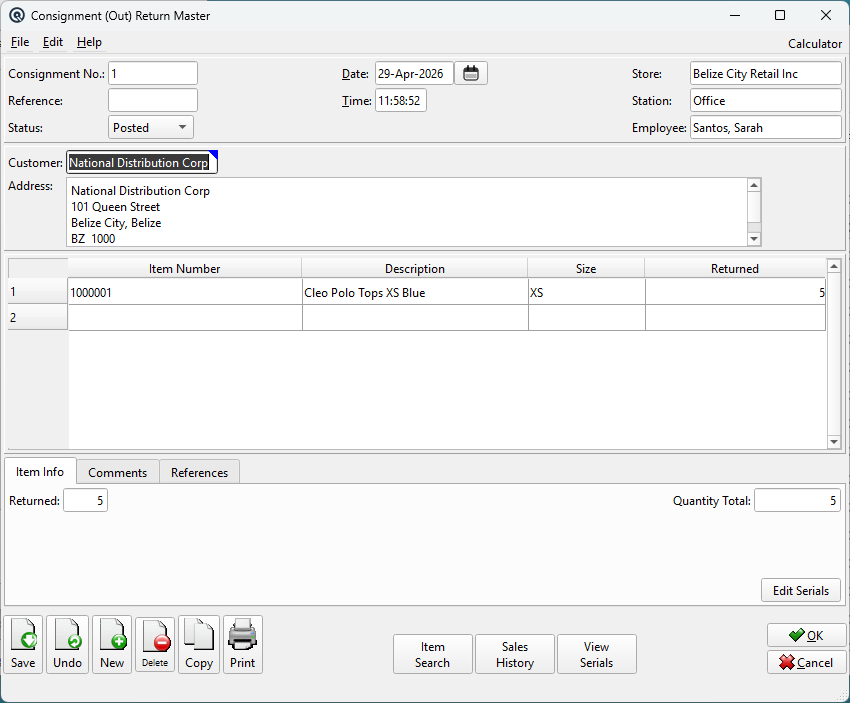
Header Fields
Consignment No.Auto-generated return number. Duplicate numbers trigger a confirmation warning. ReferenceOptional reference number. StatusDropdown: Posted, Suspended, or Voided. DateTransaction posting date. TimeTime of posting. StoreStore where the transaction is posted. Changing the store validates item stocking and removes unstocked items. StationWorkstation or terminal. EmployeeEmployee responsible for the transaction. |
Customer
CustomerThe customer returning the goods (lookup). Changing the customer updates the address, populates customer-defined references, and removes items restricted by customer group. AddressCustomer address (auto-filled, editable). |
Item Lines
Items TableItems being returned from the customer. Lookup restricted to sold, consignment-out eligible items that the customer is allowed to purchase. Quantity must be zero or positive. Serial numbers collected automatically for serial-tracked items.
|
Tabs
|
The lower panel has tabs for Item Info, Comments, and References. |
Item Info Tab

|
Comments Tab

|
Free-text comments for the return. |
References Tab

|
Name/Data pairs for tracking references. Customer-defined references are auto-prompted when selecting a customer. |
Action Buttons
Item SearchSearch within the return by Item Number or Description. Sales HistoryOpens the Sales History window for the selected item. View SerialsShows all serial numbers assigned across all return lines. |
Standard Buttons
|
Save — Saves the return. Optionally prompts to print. |
Related Screens
| Return List | Consignment Out | Consignment Status |
| Quasar Accounting 7.1 • © Linux Canada Inc. • Table of Contents |