
Purchases
Order Template Master
The Order Template Master creates or edits a purchase order template with pre-defined items, sizes, and charges.
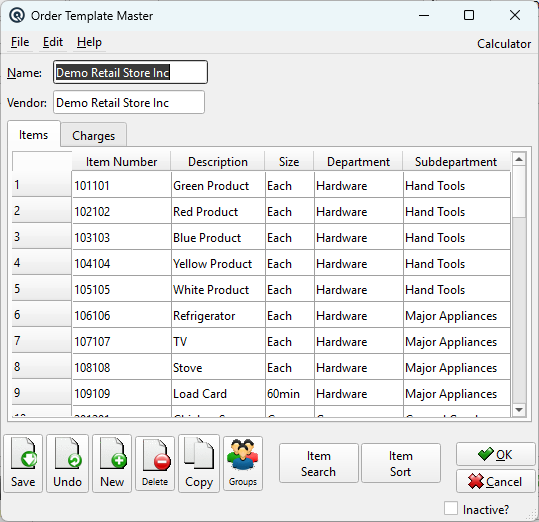
General
NameTemplate name. VendorDefault vendor for orders created from this template. |
Items Tab
|
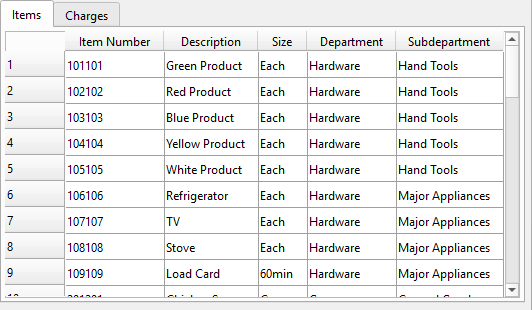
Pre-loaded items that are included when generating a purchase order from this template. Use Sort and Search buttons to organize the list. Item SearchFinds an item in the template list. Item SortRe-orders the items in the template list. Item NumberItem number or scan code. DescriptionAuto-populated item description. SizeDefault ordering size. Department / SubdepartmentItem’s department and subdepartment classification. |
Charges Tab
|
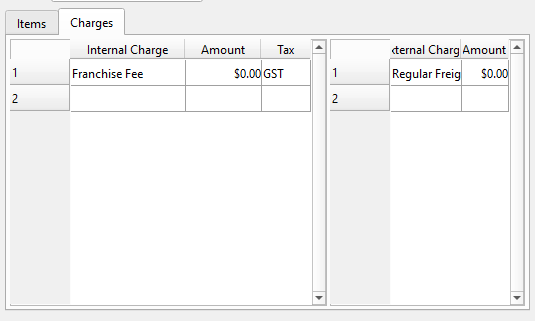
Default charges applied to orders created from this template. Internal Charge / Amount / TaxCharges absorbed into item cost (e.g., freight, duty). Tax code may be applied. External Charge / AmountCharges posted separately, not added to item cost. |
Standard Buttons
SaveSaves the template. UndoReverts changes since the last save. NewOpens a blank template. DeleteDeletes the template. CopyCreates a duplicate template. GroupsAssign the template to security/data groups. OKSaves and closes the screen. CancelCloses without saving changes. |
Standard Buttons
SaveSaves the template. UndoReverts changes since the last save. NewOpens a blank template. DeleteDeletes the template. CopyCreates a duplicate template. GroupsAssign the template to security/data groups. OKSaves and closes the screen. CancelCloses without saving changes. |
Related Screens
| Order Template List | Purchase Order | Charge Master |
| Quasar Accounting 7.1 • © Linux Canada Inc. • Table of Contents |