
Card File & CRM
Job List
The Job List displays all jobs (work assignments). Jobs are sub-units of tasks with their own time tracking and billing. Access from Card File › Jobs.
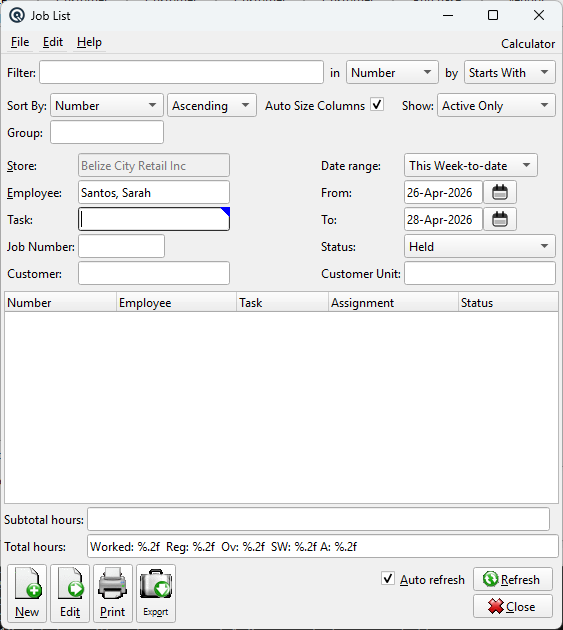
List Columns
NumberJob number. Job DescriptionJob description. TaskParent task. StatusCurrent job status (Held or Complete). |
Default Columns
| Column | Description |
| Number | Job number. |
| Employee | Employee assigned to the job. |
| Task | Parent task. |
| Assignment | Assignment number within the task. |
| Status | Held or Complete. |
Available Columns
Additional columns configurable via list settings.
| Column | Description |
| Store | Store where the work was performed. |
| Date in | Date the employee signed in. |
| Date out | Date the employee signed out. |
| Time in | Time the employee signed in. |
| Time out | Time the employee signed out. |
| Hours | Formatted hours summary. |
| Calculated hours | Hours calculated from sign-in/out times. |
| Hours worked | Recorded hours worked. |
| Regular | Regular hours. |
| Overtime | Overtime hours. |
| Stat (worked) | Statutory holiday hours worked. |
| Allowance | Allowance hours. |
| Job Description | Full job description. |
| Work Order | Linked sales order number. |
Filters
FilterQuick-search the displayed list. Type text to instantly filter rows by matching against the selected column. Use the in dropdown to choose which column to search, and the by dropdown to switch between Starts With, Contains, or Exact Match. Tip: If you do not see the column you want to search or view, go to File → Configure to customize which columns are displayed in the list. Sort Column & MethodChoose the column used to sort the list. Use the second dropdown to switch between Ascending and Descending order. Auto Size ColumnsWhen checked, columns automatically resize to fit their contents each time the list refreshes. When unchecked, column widths are saved between sessions. StatusFilter by job status: StoreFilter by store. Defaults to the current store and is read-only. EmployeeFilter by employee. Defaults to the current employee; change to view other employees' jobs (subject to security). TaskFilter by parent task. Job NumberFilter by job number. CustomerFilter by customer. Customer UnitFilter by customer unit. Date RangeSelect a predefined date range (Today, This Week, This Month, etc.). The From/To dates update automatically. FromStart date for the filter range. ToEnd date for the filter range. |
Summary
Subtotal HoursSubtotal of hours for the currently filtered rows (within the selected date range). Total HoursTotal of all hours for the currently filtered rows. |
Related Screens
| Job Master | Task Master |
| Quasar Accounting 7.1 • © Linux Canada Inc. • Table of Contents |