
More Topics
Gift Card / Store Credit History
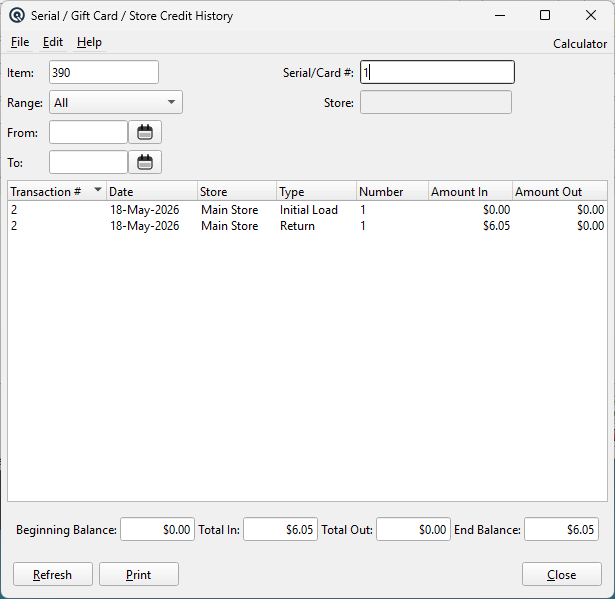
The Gift Card / Store Credit History provides a complete, transaction-by-transaction audit trail of value flowing in and out of a gift card or store credit. It shows the initial activation amount, every redemption (sale), return (refund back to card), and top-up (tender adjustment), along with running balance totals. This is the primary tool for investigating card balance disputes and verifying card activity. Access from Setup › Inventory › Gift Card History, or via the History button on the Serial Number List.
Filter Fields
ItemFilter by item. Select a gift card or store credit item. Optional if a Serial/Card # is provided. Serial/Card #The serial number or card number to look up. Supports partial matching (case-insensitive). Either this or Item is required. RangePre-set date range (All, Today, This Week, This Month, etc.). Selecting a range automatically sets the From and To dates. FromStart date filter. Transactions before this date are excluded from the list but contribute to the Beginning Balance. ToEnd date filter. Transactions after this date are excluded entirely. StoreFilter by store where the transaction occurred. Leave blank to show transactions across all stores. |
Transaction List
|
The list shows all transactions affecting the card's value, in chronological order: Transaction ListThe list displays all transactions matching the selected filters. Transaction #The source transaction number. For initial load rows, this is the transaction that created the serial. DatePost date of the transaction. StoreStore where the transaction occurred. TypeTransaction type: NumberThe serial/card number. Amount InValue added to the card (initial loads, returns, top-ups). Amount OutValue removed from the card (invoice redemptions). Double-click any row to open the source transaction for editing. |
Balance Summary
|
The balance bar at the bottom provides a financial summary: Beginning BalanceThe card balance as of the From date. Includes all activity prior to the date range (initial loads minus redemptions). Shows 0.00 when Range is “All”. Total InSum of all Amount In values within the date range (initial loads + returns + top-ups). Total OutSum of all Amount Out values within the date range (invoice redemptions). End BalanceCalculated as Beginning Balance + Total In − Total Out. This is the card's remaining value. |
Data Sources
|
The history is assembled from two data sources: 1. Initial Amount (i_s_extra) — The “Initial Amount” metadata stored with the serial record when the card was activated. This appears as the “Initial Load” row. |
Actions
RefreshRe-queries the database with the current filter settings and recalculates all balances. Generates a printable report of the current history including all title information, balance summary, and transaction rows. CloseCloses the history window. |
Related Screens
| Serial Numbers | Serial Master | Item Master |
| Quasar Accounting 7.1 • © Linux Canada Inc. • Table of Contents |