
Assets & Depreciation
Asset Type List
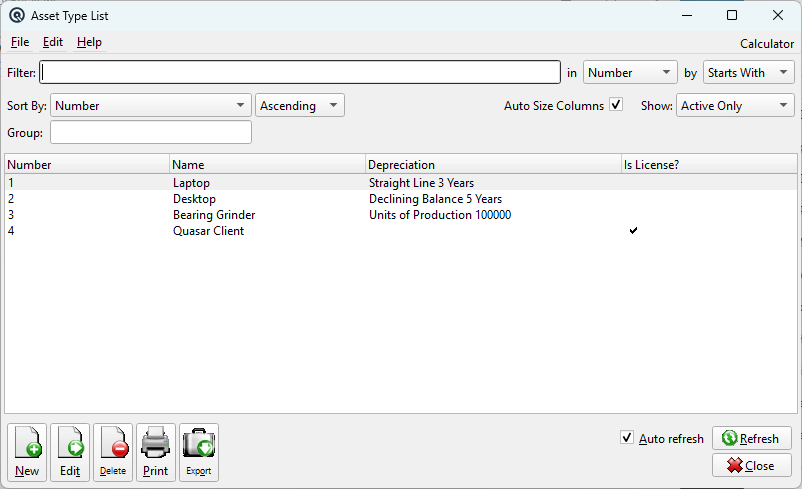
The Asset Type List displays all fixed asset categories. Each asset type defines default GL accounts and a depreciation method that are inherited by individual assets. Access from Assets › Asset Types.
Filters
FilterQuick-search the displayed list. Type text to instantly filter rows by matching against the selected column. Filter ColumnColumn to search within. Filter MethodSearch method: Starts With, Contains, or Exact Match. Sort ColumnColumn to sort the list by. Sort MethodSort order: Ascending or Descending. Auto Size ColumnsWhen checked, columns auto-size to fit their contents. When unchecked, column widths are saved between sessions. ShowFilter by activity status: Active Only, Inactive Only, or Active & Inactive. GroupFilter the list by group. |
List
ListThe main list view showing all records. Double-click a row to edit. Right-click for options. NewCreate a new record. EditEdit the selected record. DeleteDelete the selected record. Print the list. ExportExport the list to a file. RefreshForce a refresh of the list data. CloseClose the list screen. |
Default Columns
| Column | Description |
| Number | Asset type number. |
| Name | Asset type name. |
| Depreciation | Linked depreciation method. |
| Is License? | Whether this type is for software licenses. |
Available Columns
Additional columns configurable via list settings.
| Column | Description |
| Description | Detailed description. |
| Asset Account | Default GL account for asset value. |
| Accumulation Account | Default GL account for accumulated depreciation. |
| Expense Account | Default GL account for depreciation expense. |
Related Screens
| Asset Type Master | Asset List | Depreciation List |
| Quasar Accounting 7.1 • © Linux Canada Inc. • Table of Contents |