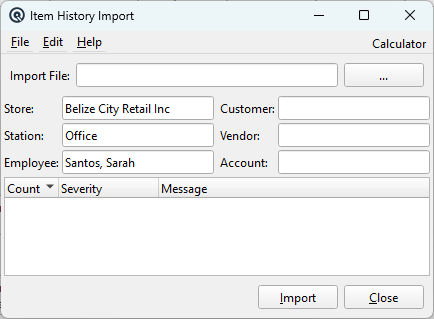
The Item History Import is the most powerful import tool in Quasar. It recreates a complete transaction history from a CSV file, automatically generating full customer invoices, customer returns, vendor receiving slips, and inventory adjustments — each with proper GL postings — organized by date. This is essential for migrating historical sales and inventory data from a previous POS system. Access from Inventory › Import Item History.
Configuration Fields
All fields are required and must be set before importing. They determine who/where transactions are assigned.
GL account for inventory adjustment offsets (the balancing entry).
CSV File Format
The CSV file must contain exactly 7 fields per line, comma-separated. Fields with commas may be single or double-quoted.
#
Field
Description
1
Date
Transaction date in a standard date format recognized by Quasar's date parser.
2
Type
Transaction type: sale, return, slip (vendor receive), or adjust (inventory adjustment). Case-insensitive.
3
Item Number
Item PLU or number. Items not found in Quasar are logged as warnings and skipped.
4
Size
Item size. If empty, defaults to the number's size or the item's sell size.
5
Quantity
Number of units.
6
Extended Cost
Total cost for this line (qty × unit cost).
7
Extended Price
Total selling price for this line (qty × unit price).
Transaction Generation Logic
The import engine is a two-pass process:
Pass 1: Data Aggregation
All CSV lines are read and combined by date. Lines with the same date, type, item, and size are aggregated (quantities and amounts summed). This minimizes the number of transactions created.
Pass 2: Transaction Creation
For each unique date, the engine creates up to four transactions:
CSV Type
Quasar Transaction
Details
sale
Customer Invoice
Creates a full invoice with the Customer, with calculated prices and price overrides. Only items flagged as “Sold” are included.
return
Customer Return
Creates a return credited to the Customer. Only items flagged as “Sold” are included.
slip
Vendor Invoice (Receive)
Creates a vendor receiving slip with the Vendor. Only items flagged as “Purchased” are included.
adjust
Item Adjustment
Creates an inventory adjustment against the specified Account. Only inventoried items are included. The adjustment account receives the offsetting entry.
All generated transactions are posted at 12:00 PM on the transaction date with memo “Item history”.
Legacy Date Handling
Records dated before January 1, 2003 receive special treatment: all types are converted to adjust and consolidated onto a single date of December 31, 2002. Sale quantities are negated to produce a net adjustment representing the cumulative historical position.
Import Results Log
Column
Description
Count
Sequential event number.
Severity
Information, Warning, or Error.
Message
Details about the event (item not found, creation success/failure, etc.).
Validates required fields, processes the CSV in two passes, and creates transactions. Dual progress dialogs show data reading and transaction creation separately.