
More Topics
Add Media
Add Media attaches files — such as images, PDFs, or documents — to any Quasar data object. Media can be linked to items, customers, vendors, invoices, or any other record in the system. This is used for back-office reference and record-keeping purposes such as attaching product photos, signed contracts, vendor agreements, or supporting documents to their related records. Note: Media attachments are not displayed at the Point of Sale terminal.
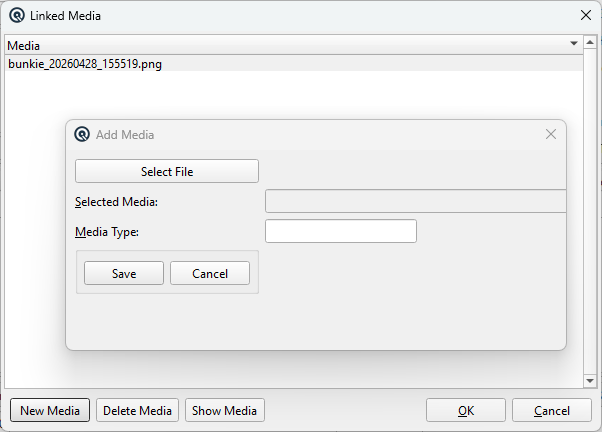
The Add Media dialog is opened from within a master screen (e.g. Item Master, Customer Master) when you click the media attachment button on a saved record.
Fields
Select FileOpens a file browser to choose a file from your local system. Any file type can be selected, but the file extension must be between 3 and 5 characters for the save to succeed (e.g. jpg, png, pdf, docx). Quasar remembers the last directory you browsed, so subsequent file selections start from the same location. Selected MediaDisplays the auto-generated unique filename for the selected file. The filename is constructed from the original name plus a timestamp (e.g. product_photo_20260428_153000.jpg) to prevent naming conflicts. This field is read-only. Media TypeRequired. Select the category for this attachment from the Media Type list. The media type determines the server subdirectory where the file is stored (e.g. /media/photos/ or /media/documents/). You must have at least one media type defined before you can attach files. Examples of media types include product images, safety data sheets, certificates, or e-invoice attachments. |
Buttons
SaveSaves the media attachment record and uploads the selected file to the server. Both the database record and the file upload must succeed. CancelCloses the Add Media dialog without creating an attachment or uploading a file. |
How It Works
|
When you click Save, Quasar performs two operations: 1. Creates a media record in the database that links the file to the parent data object. The record stores the object type, object ID, filename, file extension, media type, and subdirectory path. 2. Uploads the file to the server's media storage directory, organized under the subdirectory defined by the media type. If the database record is created but the file upload fails, an error is displayed so you can retry. Media attachments persist with the parent record. The same data object can have multiple media files attached, even of different types. |
Related Screens
| Item Master | Customer Master | Vendor Master | Media Type Master |
| Quasar Accounting 7.1 • © Linux Canada Inc. • Table of Contents |