
Purchases
Charge Master
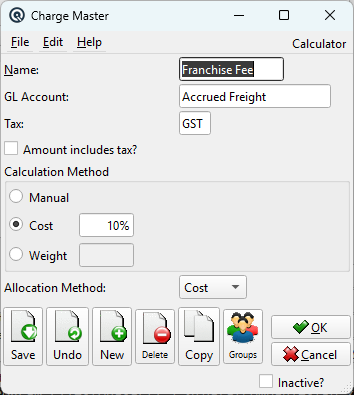
The Charge Master defines reusable charge types that can be applied to Purchase Orders, Vendor Invoices, and Vendor Claims. Charges represent additional costs incurred when acquiring goods — such as freight, brokerage fees, customs duty, franchise fees, or handling surcharges. While the Charge Master screen itself is compact, the feature it enables is powerful: it is the mechanism Quasar uses to calculate true landed cost, ensuring that the full cost of getting goods to your shelf is reflected in your inventory valuation and margin reporting. Access from Purchasing › Charge Master. Security screen: ChargeMaster.
Internal vs. External Charges
|
When a charge is added to a Purchase Order or Vendor Invoice, it is classified as either Internal or External. This distinction is the key to understanding landed cost in Quasar:
The Internal/External flag is set on each charge line when it is added to a transaction, not on the charge definition itself. This means the same charge (e.g., “Freight”) can be applied as internal on one invoice and external on another, depending on the business context.
|
Fields
NameDescriptive name for the charge (up to 20 characters). Examples: “Freight”, “Customs Duty”, “Brokerage”, “Franchise Fee”, “Handling”. GL AccountThe General Ledger account where the charge amount is posted. For internal charges this is typically a freight or duty accrual account; for external charges this is the expense account that will carry the cost. TaxThe tax code applied to this charge. Some charges (like freight) may attract GST/HST/VAT; others (like duty) are typically tax-exempt. Select the appropriate tax to ensure correct tax calculation on the charge amount. Amount includes tax?When checked, the charge amount entered on the transaction is treated as tax-inclusive. The system back-calculates the base amount and tax portion. When unchecked, tax is added on top of the entered amount. |
Calculation Method
|
The calculation method determines how the charge amount is computed when the charge is applied to a transaction. Only one method can be active per charge definition: ManualNo automatic calculation. The user enters the charge amount directly on each Purchase Order or Vendor Invoice. Use this for charges that vary per shipment (e.g., a one-time customs brokerage fee). CostAutomatically calculates the charge as a percentage of the total item cost on the transaction. For example, a 5% franchise fee on a $10,000 invoice produces a $500 charge. Ideal for charges that scale proportionally with order value. PercentThe percentage rate used when the Cost calculation method is selected. Enter the rate as a percentage (e.g., 5 for 5%). WeightAutomatically calculates the charge as a dollar amount per unit of weight. For example, $0.25/kg freight on 200 kg of goods produces a $50.00 charge. Ideal for shipping costs where freight is quoted by weight. DollarThe dollar amount per weight unit used when the Weight calculation method is selected. When using Cost or Weight calculation, the system pre-fills the charge amount on the transaction. The user can still override the calculated amount if needed (e.g., a negotiated freight discount on a particular shipment). |
Allocation Method
|
The allocation method controls how the total charge amount is distributed across individual line items on the transaction. This is critical for internal charges, because the allocated portion directly affects each item’s landed cost:
|
Where Charges Are Applied
|
Once defined here, charges are added to transactions through the Charges tab on the following screens:
|
Common Charge Definitions
|
Related Screens
| Charge List | Vendor Invoice | Purchase Order | Order Template | Vendor Claim |
| Quasar Accounting 7.1 • © Linux Canada Inc. • Table of Contents |