
Customers & Sales
Payment
The Payment screen is a streamlined payment entry form for issuing outgoing payments via cheque, card, or online transfer. It supports three payment types: Quick Pay (direct GL account allocation), Pay Vendor (allocate against open vendor invoices), and Pay Customer (refund against open customer credits). For full cheque management with invoice-level discount tracking and cheque printing, use the Cheque Master. Access from Cheque Book › Vendor Cheques.
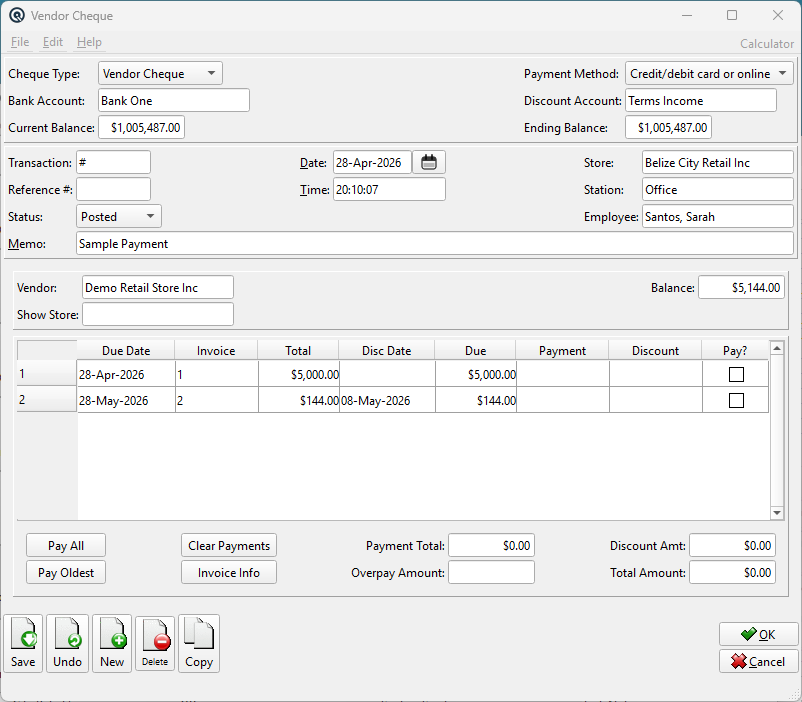
Header Fields
Payment No.Unique identifier. Enter # to auto-generate. DatePayment date. Defaults to today. TimePayment time. StoreStore posting the payment. |
Payment Details
TypeSelects the payment mode. This changes the allocation area: VendorThe payee. Only one is visible based on the selected Type. Selecting a vendor or customer auto-fills the name, address, and loads their outstanding balance. CustomerThe payee. Only one is visible based on the selected Type. Selecting a vendor or customer auto-fills the name, address, and loads their outstanding balance. BalanceRead-only outstanding balance for the selected vendor or customer. MethodHow the payment is issued: Bank AccountGL bank account the payment is drawn from. Reference / Cheque #Cheque number or external reference number depending on the payment method. |
Payment Body
AmountTotal payment amount. NamePayee name (editable). Auto-filled from vendor/customer selection. Get Name and Address from address bookButton to select from the address book (Quick Pay mode only). AddressPayee mailing address (multi-line, editable). MemoPayment memo (up to 40 characters). Printed on the cheque stub. |
Quick Pay — Account Allocation
|
In Quick Pay mode, distribute the payment amount across one or more GL accounts. Account — GL account to debit. |
Pay Vendor / Pay Customer — Invoice Allocation
|
In Pay Vendor or Pay Customer mode, open invoices are displayed for allocation. Date — Invoice date. DiscountEarly-payment discount amount (editable). PaymentAmount to pay (editable). Pay? — Check to pay the full balance. |
Standard Buttons & Menu
SaveSaves and posts the payment. Validates duplicate cheque numbers against the bank account. DeleteVoids the payment. Reverses all GL postings. CopyDuplicates with a new number and today's date. File › RecurringCreates a Recurring transaction from this payment. |
Related Screens
| Cheque Master | Print Cheques | Pay Bills | Customer Payment |
| Quasar Accounting 7.1 • © Linux Canada Inc. • Table of Contents |