
Setup & Configuration
Group Master
The Group Master creates or edits a group. Groups are used throughout Quasar to organize data — items, customers, vendors, employees, stores, and more. Groups can then be used to filter lists, run reports on subsets of data, and control access.
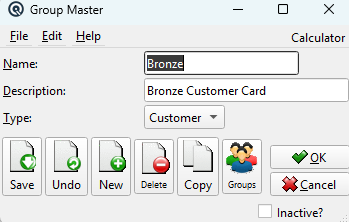
Fields
NameThe group name. DescriptionA description of the group. TypeThe type of data this group categorizes: Item, Customer, Vendor, Employee, Personal, Store, Account, or Tender. |
Toolbar
Save / Undo / New / Delete / Copy / Groups / Print / EmailStandard master screen toolbar actions. OK / CancelSave and close, or discard and close. Inactive?Toggle to deactivate the record. |
Related Screens
| Group List | Group Manager |
| Quasar Accounting 7.1 • © Linux Canada Inc. • Table of Contents |