
Card File & CRM
Patronage Group Master
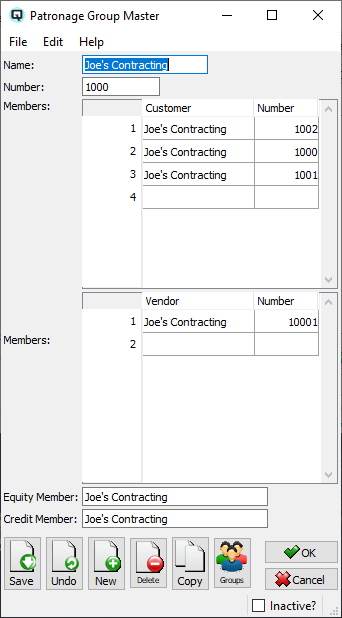
The Patronage Group Master groups multiple customers and/or vendors into a single entity for consolidated reporting and patronage dividend processing. While originally designed for cooperative dividend distribution, patronage groups are a powerful general-purpose tool for any business that needs to track combined activity across related accounts. Access from Card File › Patronage Group Master or from the Patronage Group List.
Beyond Cooperatives — The Power of Grouping
|
A patronage group links multiple separate customer and vendor accounts into one logical entity. This is invaluable any time you need to see the combined picture across related accounts: Multi-Business OwnersA single owner may operate 8 different businesses, each with its own customer account in Quasar. By assigning all 8 accounts to one patronage group, you can run Aged Receivables and see the owner's total outstanding balance across all their businesses in a single view — rather than hunting through 8 separate customer records. This gives you a true picture of credit exposure and helps make informed decisions about extending further credit to any of the owner's entities. Franchise NetworksA franchise head office and its individual franchise locations can be grouped together. This lets you view combined purchasing volume, total receivables, or total payables across the entire network, while still maintaining separate transaction histories for each location. Related Vendor AccountsA large supplier may invoice through different divisions (e.g., one for produce, one for dry goods, one for frozen). Grouping these vendor accounts together shows your total payables exposure to that supplier across all divisions. Family or Household AccountsRetail operations where family members have separate accounts can group them for combined loyalty tracking, total purchase volume, or consolidated statements. Cooperative Dividend ProcessingThe original use case: co-op members (both customer-members and vendor-members) are grouped for annual patronage dividend calculations via the Patronage Worksheet. The group's Equity Member and Credit Member fields specify the special customer accounts used for posting dividend allocations. |
How It Works with Aged Receivables
|
Scenario: John Smith owns 8 retail locations, each set up as a separate customer in Quasar. His total credit line is $100,000 across all businesses. • Without a patronage group: You would need to manually find and add up all 8 customer balances to know John's total receivable. If any single business looks fine individually but the combined total exceeds the credit limit, you would miss the risk. |
Fields
NameThe group name (up to 20 characters). Use a name that clearly identifies the grouping. Examples: Smith Enterprises, ABC Franchise Network, GreenCo Co-op Members. NumberUnique group number (up to 12 characters) for sorting and reference. Customer MembersEditable table of customer accounts that belong to this group. Add as many customers as needed — each row links a customer to this group. A new blank row appears automatically as you add entries. CustomerCustomer lookup. Select the customer account to add to this group. Vendor MembersEditable table of vendor accounts that belong to this group. Same structure as the customer table. Useful when the same entity is both a customer and a vendor, or for grouping related supplier divisions. VendorVendor lookup. Select the vendor account to add to this group. Equity MemberA customer account used for posting patronage equity allocations. In a cooperative context, this is the member's equity account where retained earnings are allocated. For non-cooperative use, this field can be left blank. Credit MemberA customer account used for posting patronage credits payable. In a cooperative context, this is where the cash portion of a dividend is posted. For non-cooperative use, this field can be left blank. InactiveWhen checked, this patronage group is marked inactive and will be excluded from default lists and new transactions. |
Practical Tips
|
• One customer, multiple groups: A customer can belong to more than one patronage group, allowing overlapping groupings (e.g., by owner and by region). |
Standard Buttons
SaveSaves the patronage group. UndoReverts changes since the last save. NewOpens a blank group. DeleteDeletes the group. CopyCreates a duplicate group. GroupsAssign the group to security/data groups. OKSaves and closes the screen. CancelCloses without saving changes. |
Standard Buttons
SaveSaves the patronage group. UndoReverts changes since the last save. NewOpens a blank group. DeleteDeletes the group. CopyCreates a duplicate group. GroupsAssign the group to security/data groups. OKSaves and closes the screen. CancelCloses without saving changes. |
Related Screens
| Patronage Group List | Patronage Worksheet | Customer Master | Vendor Master |
| Quasar Accounting 7.1 • © Linux Canada Inc. • Table of Contents |