
Accounts & Ledger
Bank Reconciliation
The Bank Reconciliation matches transactions in Quasar to your bank statement. Check off cleared items until the difference reaches zero.
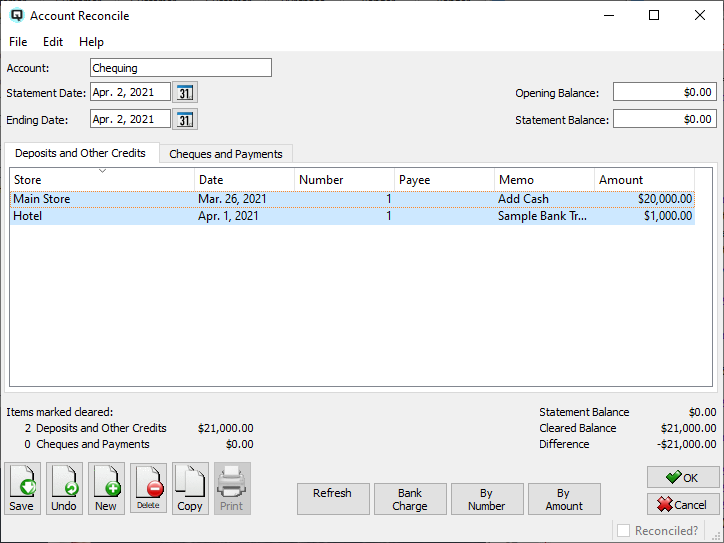
General
AccountBank account to reconcile. Statement DateDate on the bank statement. Statement BalanceEnding balance on the bank statement. DifferenceShows the difference between cleared items and the statement balance. Must be zero to complete. |
Deposits and Other Credits Tab
|
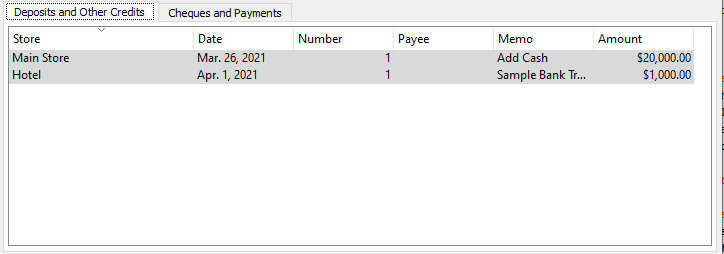
Lists all deposit and credit transactions for the account. Check the box next to each item that appears on the bank statement to mark it as cleared. |
Cheques and Payments Tab
|
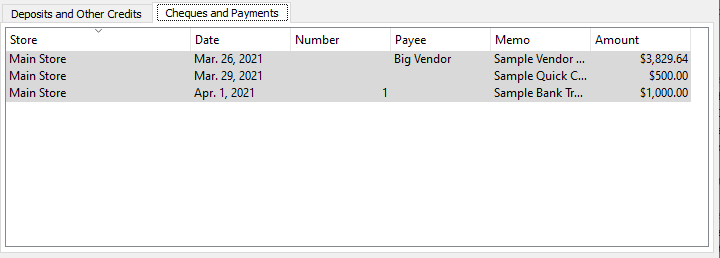
Lists all cheque and payment (debit) transactions for the account. Check items that appear on the bank statement to mark them as cleared. |
Toolbar Actions
RefreshReloads the unreconciled transactions for the selected account and date range. Bank ChargeOpens a dialog to record a bank charge or interest transaction directly from the reconcile screen. By NumberMarks transactions cleared by entering cheque/deposit numbers instead of clicking each row. By AmountMarks transactions cleared by entering amounts instead of clicking each row. Save / Undo / New / Delete / CopyStandard master screen actions. OK / CancelSave and close, or discard and close. |
Related Screens
| Reconcile List | Account List |
| Quasar Accounting 7.1 • © Linux Canada Inc. • Table of Contents |