
More Topics
Card Adjustment List
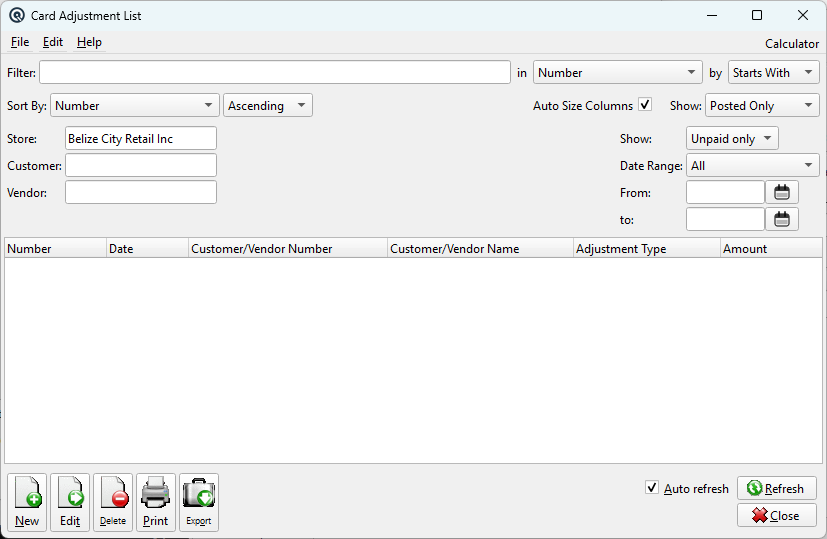
The Card Adjustment List displays all customer/vendor balance adjustments.
Filters
StoreFilter transactions by store. Defaults to the current store. Clear the field to show transactions from all stores. ShowFilter by payment status: StatusFilter by transaction posting status: CustomerFilter by a specific customer. Leave blank to show all customers. VendorFilter by a specific vendor. Leave blank to show all vendors. Date RangeRestrict the list to a specific date period. Select a preset or choose Custom to enter specific From/To dates. FromThe start date when using a custom date range filter. ToThe end date when using a custom date range filter. E-Invoice StatusFilter by electronic invoice certification status. Only visible when electronic invoicing is enabled. Error CodeFilter by a specific e-invoice error code. Only visible when the E-Invoice Status is set to Failed. Retry All FailedButton to retry all failed e-invoice submissions. Only visible when E-Invoice Status is Failed. FilterQuick-search the displayed list. Type text to instantly filter rows by matching against the selected column. Filter ColumnColumn to search within. Filter MethodSearch method: Starts With, Contains, or Exact Match. Sort ByColumn to sort the list by. Sort MethodSort order: Ascending or Descending. Auto Size ColumnsWhen checked, columns auto-size to fit their contents. When unchecked, column widths are saved between sessions. GroupFilter the list by group. |
List
ListThe main list view showing all records. Double-click a row to edit. Right-click for options. NewCreate a new record. EditEdit the selected record. DeleteDelete the selected record. Print the list. ExportExport the list to a file. RefreshForce a refresh of the list data. CloseClose the list screen. |
Default Columns
| Column | Description |
| Number | Adjustment number. |
| Date | Adjustment date. |
| Customer/Vendor Number | Card number. |
| Customer/Vendor Name | Card name. |
| Adjustment Type | Type of adjustment. |
| Amount | Adjustment amount. |
| E-Invoice Status | E-invoice certification status. |
Available Columns
Additional columns configurable via list settings.
| Column | Description |
| Balance Due | Remaining balance. |
| Card Amount | Card amount. |
| Employee Name | Employee name. |
| Employee Number | Employee number. |
| Error Code | E-invoice failure code. |
| Error Message | E-invoice failure message. |
| Memo | Transaction memo. |
| MIN Number | Machine ID Number. |
| Paid? | Whether fully applied. |
| Posted? | Whether posted. |
| Printed? | Whether printed. |
| Reference | Reference string. |
| Station Name | Station name. |
| Station Number | Station number. |
| Store Name | Store name. |
| Store Number | Store number. |
| Time | Time of posting. |
Related Screens
| Card Adjustment |
| Quasar Accounting 7.1 • © Linux Canada Inc. • Table of Contents |