
More Topics
Business Feature Settings
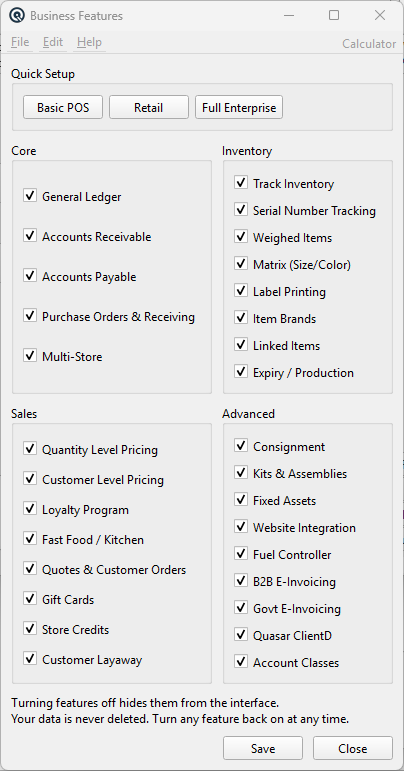
The Business Features screen lets you decide which capabilities Quasar activates for your company. Turning a feature off hides its menus, toolbar buttons, report entries, and screen columns from the interface. Your data is never deleted — turn any feature back on at any time and everything reappears. Access this screen from File › Business Features.
|
Quick Setup
Use these buttons to quickly configure Quasar for a common business scenario. Each button sets a predefined combination of features.
Basic POSMinimal configuration for a simple point-of-sale operation. Enables only inventory tracking and basic sales. Disables GL, AR, AP, purchasing, and all advanced features. |
RetailA typical retail store configuration. Enables inventory, purchasing, GL, AR, and common retail features like labels and promotions. Disables specialized features like consignment and fuel controllers. |
Full EnterpriseEnables all features. Suitable for businesses that use the complete Quasar capability set including multi-store, consignment, assets, e-invoicing, and fuel site management. |
Core
General LedgerChart of Accounts, journal entries, balance sheet, profit & loss, trial balance. The foundation of double-entry accounting. Accounts ReceivableCustomer invoicing, payments on account, aged receivables, customer statements, and service charges. Accounts PayableVendor invoices, pay bills, aged payables, and vendor payment tracking. Purchase Orders & ReceivingPurchase orders, order templates, auto-ordering, receiving slips, vendor claims, and on-order reporting. Multi-StoreOperate multiple store locations with separate inventory, pricing by zone, and inter-store transfers. |
Inventory
Track InventoryMaster item file, departments, subdepartments, stock status, item history, and physical inventory counts. Serial Number TrackingTrack individual units by serial number for warranty, recall, or gift card/store credit management. Weighed ItemsSupport for items sold by weight (e.g., produce, deli) with tare weight and scale integration. Matrix (Size/Color)Manage items with size and color variations as a single matrix item with automatic SKU generation. Label PrintingLabel batches for shelf labels and barcode printing. Item BrandsOrganize items by brand for filtering and reporting. Linked ItemsCreate relationships between items (substitutes, accessories, companion products). Expiry / ProductionTrack item expiry dates and production batch information. |
Sales
Quantity Level PricingSet different prices based on the quantity purchased (buy more, pay less). Customer Level PricingAssign price levels to customers so different customers see different regular prices. Loyalty ProgramAward loyalty points to customers based on purchases and allow redemption through loyalty discounts. Fast Food / KitchenKitchen display integration and fast-food order flow for restaurant operations. Quotes & Customer OrdersCreate customer quotations and sales orders that can be converted into invoices. Gift CardsSell, track, and redeem gift cards with serial number management and balance history. Store CreditsIssue store credits during returns, track balances, and accept store credits as payment. Customer LayawayEnable customer layaway transactions to reserve items with a partial payment and complete the sale later. |
Advanced
Account ClassesTrack revenue and expense transactions by category (e.g. product lines, departments, projects). When enabled, Account Class columns and fields appear on General Journals, Cheques, Card Adjustments, Payouts, Item Adjustments, Tender Adjustments, Vendor Invoices, and Vendor Claims. Reports such as the Profit & Loss and Trial Balance can show a breakdown by class. See the Account Class Master for setup details. ConsignmentConsignment in (receive goods on consignment from vendors) and consignment out (send goods on consignment to customers), with returns for both directions. Kits & AssembliesBuild composite items from components and manage production batches. Fixed AssetsTrack capital assets with depreciation schedules and automated depreciation posting. Website IntegrationExport data for e-commerce website integration. Fuel ControllerFuel pump controller integration, tank status monitoring, and fleet fuel reporting for petroleum retailers. B2B E-InvoicingElectronic invoice exchange between businesses using UBL/PEPPOL standards. Govt E-InvoicingGovernment-mandated electronic invoicing and certification (BIR, BTS, SAT/CFDI) for regulatory compliance. Quasar ClientDEnable the Quasar Point-of-Sale client daemon integration for POS terminal operations. |
Action Buttons
SaveSave the current feature selections to the company database. All connected clients will see the updated interface when they refresh or re-open screens. CloseClose the window without saving any unsaved changes. |
Related Screens
| Quasar Configuration | Store Master | Security Types |
| Quasar Accounting 7.1 • © Linux Canada Inc. • Table of Contents |