
Setup & Configuration
Sequence Numbers
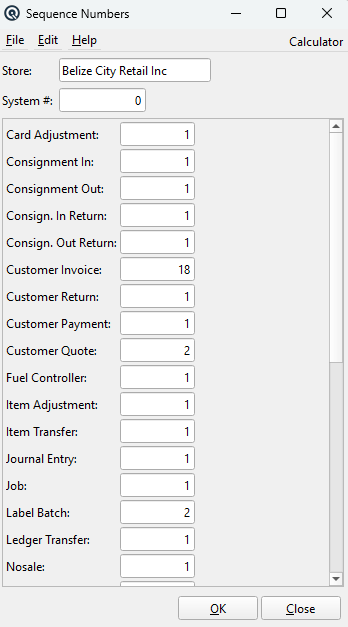
The Sequence Number screen controls the automatic numbering for each transaction and record type. When you enter # in a number field, Quasar replaces it with the next number in the sequence. Access from Setup › System › Sequence Numbers.
Fields
StoreSelect the store whose sequence numbers you want to view or edit. Most sequence numbers are store-specific — each store maintains its own independent numbering so that, for example, Store A and Store B can each have their own Invoice #1, #2, #3, etc. System #The POS system number. In multi-terminal environments each terminal can have its own numbering stream within a store, identified by its system number. Set to 0 for the default stream. |
Store-Specific Sequence Numbers
These numbers are maintained per store. Each store has its own independent counter. Changing the Store dropdown shows different values.
Card AdjustmentNext number for card balance adjustments. By store. Customer InvoiceNext number for customer invoices / sales. By store. Customer ReturnNext number for customer returns. By store. Customer PaymentNext number for customer payment receipts. By store. Item AdjustmentNext number for inventory adjustments. By store. Item TransferNext number for inventory transfers between stores. By store. Journal EntryNext number for general ledger journal entries. By store. Ledger TransferNext number for ledger balance transfers. By store. NosaleNext number for no-sale (cash drawer open) transactions. By store. PayoutNext number for cash payouts from the till. By store. ShiftNext number for cashier shifts. By store. Tender AdjustmentNext number for tender count adjustments. By store. Tender TransferNext number for tender transfers (safe drops, etc.). By store. Vendor InvoiceNext number for vendor invoices (purchases). By store. Vendor ClaimNext number for vendor claims / returns. By store. WithdrawNext number for cash withdrawals. By store. |
Global Sequence Numbers
These numbers are shared across all stores. The Store dropdown does not affect them — the same counter is used company-wide.
Consignment InNext number for consignment-in receipts. Global. Consignment OutNext number for consignment-out shipments. Global. Consign. In ReturnNext number for consignment-in returns. Global. Consign. Out ReturnNext number for consignment-out returns. Global. Customer QuoteNext number for customer quotes / estimates. Global. Fuel ControllerNext number for fuel controller records. Global. JobNext number for job / project records. Global. Label BatchNext number for label print batches. Global. Packing SlipNext number for packing slips (receiving). Global. Physical CountNext number for physical inventory counts. Global. Price BatchNext number for price change batches. Global. Promo BatchNext number for promotional batches. Global. Purchase OrderNext number for purchase orders. Global. Sales OrderNext number for sales orders / layaways. Global. Special PurchaseNext number for special purchase orders. Global. Store CreditNext number for store credit certificates. Global. TaskNext number for task / work order records. Global. |