
Assets & Depreciation
Asset List
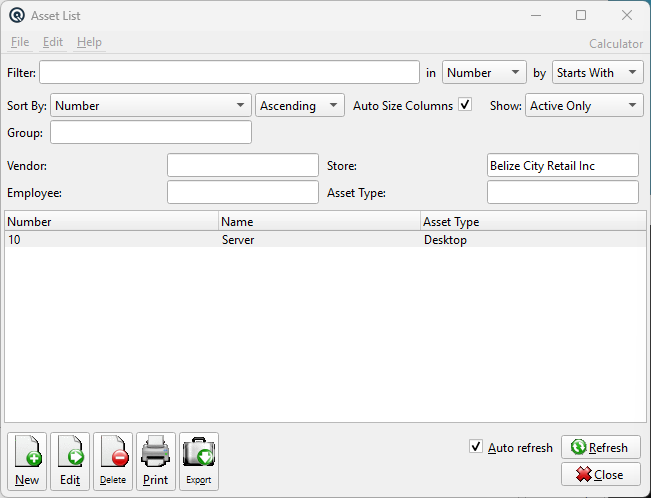
The Asset List displays all fixed assets and software licenses in the system. Use the filters to narrow by vendor, store, employee, or asset type. Access from Assets › Assets.
Filters
VendorFilter by the vendor the asset was purchased from. StoreFilter by store location (defaults to current store). Changing the store clears the Employee filter. EmployeeFilter by the employee who created the asset. Scoped to the selected store. Asset TypeFilter by asset type classification. FilterQuick-search the displayed list. Type text to instantly filter rows by matching against the selected column. Filter ColumnColumn to search within. Filter MethodSearch method: Starts With, Contains, or Exact Match. Sort ColumnColumn to sort the list by. Sort MethodSort order: Ascending or Descending. Auto Size ColumnsWhen checked, columns auto-size to fit their contents. When unchecked, column widths are saved between sessions. ShowFilter by activity status: Active Only, Inactive Only, or Active & Inactive. GroupFilter the list by group. |
List
ListThe main list view showing all records. Double-click a row to edit. Right-click for options. NewCreate a new record. EditEdit the selected record. DeleteDelete the selected record. Print the list. ExportExport the list to a file. RefreshForce a refresh of the list data. CloseClose the list screen. |
Default Columns
| Column | Description |
| Number | Asset number. |
| Name | Asset name. |
| Asset Type | Name of the assigned asset type. |
Available Columns
Additional columns configurable via list settings.
| Column | Description |
| Description | Asset description. |
| Manufacturer | Manufacturer name. |
| Model | Model number/name. |
| Serial | Serial number. |
| Store | Store name. |
| Employee Name | Created-by employee name. |
| Vendor | Vendor name. |
| Replacement | Linked replacement inventory item description. |
| Purchase Date | Acquisition date. |
| Cost | Original asset cost. |
| Depreciated | Accumulated depreciation amount. |
| Last Depreciated | Date of last depreciation run. |
| Warranty Start | Warranty coverage start date. |
| Warranty End | Warranty coverage end date. |
| License Expiry | License expiration date. |
| Warranty | Warranty terms text. |
| Seats | Number of license seats. |
| Assignable? | Whether the license can be re-assigned. |
| Note | First line of asset notes. |
| Accumulation Acct | GL account for accumulated depreciation. |
| Asset Acct | GL account for asset value. |
Related Screens
| Asset Master | Asset Type List | Depreciation List |
| Quasar Accounting 7.1 • © Linux Canada Inc. • Table of Contents |