
Customers & Sales
Return Allocation
Return Allocation applies a customer return credit against outstanding invoices and other open transactions. The screen loads automatically when a customer return is entered with an unapplied credit balance. Use it to allocate the return amount to specific transactions, take a quick payment, or let Quasar auto-allocate to the oldest open items.
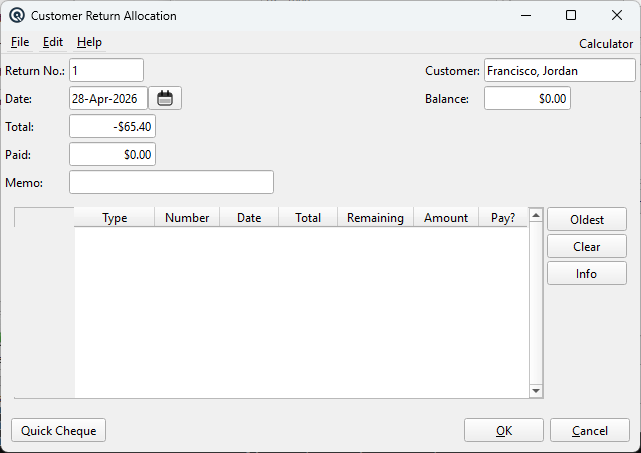
Return Details
Return No.The customer return transaction number. Read-only. DateThe posting date of the customer return. Read-only. TotalThe total credit amount of the customer return. Read-only. PaidThe amount already applied from this return. Read-only. CustomerThe customer whose return is being allocated. Read-only. BalanceThe customer's current outstanding balance. Read-only. MemoThe memo from the customer return. Read-only. |
Allocation Table
|
Lists open transactions for the customer that can be paid with the return credit. Each row shows the transaction type, number, date, original total, remaining balance, and editable amount to apply. Type — Transaction type (e.g., Invoice, Credit). |
Allocation Actions
OldestAuto-allocates the return credit to the oldest open transactions first, starting from the top of the list. ClearClears all entered allocation amounts so you can start over. InfoOpens the original customer return for viewing. |
Action Buttons
Quick PaymentCreates a customer payment from the allocated amount. OKSaves the allocations and closes the window. CancelCloses the window without saving allocations. |
Related Screens
| Customer Return | Invoice List | Customer Payment |
| Quasar Accounting 7.1 • © Linux Canada Inc. • Table of Contents |