
Setup & Configuration
User Master
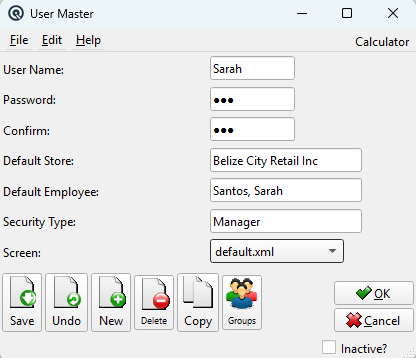
The User Master creates or edits a login account. Each user logs in with a name and password and is governed by a security type that controls what screens and actions they can access. Access from Setup › System › Users, then click New or Edit.
|
General
User NameThe login name for this user. Must be unique across all users. Change Password?Check this box to set or change the user's password. When checked, the password and confirm fields become active. PasswordEnter the new password. Passwords are case-sensitive. ConfirmRe-enter the password to confirm. Must match the Password field. Default StoreThe default store this user works in. This store is pre-selected when the user logs in and determines which data they see by default. Default EmployeeLink this user to an employee record. The employee link connects the login account to HR data like hours and wages. Security TypeThe security profile that controls this user's permissions. Determines which screens, reports, and actions the user can access. See Security Type Master to create and manage security profiles. For a detailed overview of the security system, see Security in the User Guide. ScreenThe default screen displayed when this user logs in (e.g., the main menu or a specific list screen). |
Toolbar Actions
Save / Undo / New / Delete / CopyStandard master screen actions. OK / CancelSave and close, or discard and close. Inactive?Toggle to deactivate the user login without deleting it. |