
More Topics
Time Clock
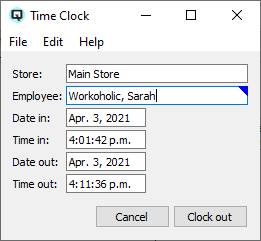
The Time Clock screen is used by employees to punch in and punch out of their shifts. It records attendance and hours worked. Access from Setup › System › Time Clock.
|
Fields
StoreSelect the store for the time clock entry. Changing the store filters the Employee selector to employees assigned to that store. EmployeeSelect the employee punching in or out. Date InDate the employee clocked in. Updated automatically when punching in. Time InTime the employee clocked in. Updated automatically when punching in. Date OutDate the employee clocked out. Enabled only when the employee is currently clocked in. Time OutTime the employee clocked out. Enabled only when the employee is currently clocked in. Clock / PunchRecords a punch in or punch out. The button label changes based on the employee's current state: "Clock In" when clocked out, "Clock Out" when clocked in. CancelCloses the Time Clock screen without recording a punch. |
Time Clock List Filters
Date RangePreset date range selector that automatically populates the From and To dates below. FromShow only time clock entries with a date in on or after this date. ToShow only time clock entries with a date in on or before this date. StoreFilter to entries for employees assigned to a specific store. EmployeeFilter to entries for a specific employee. CustomerFilter to entries associated with a specific customer. Customer UnitFilter to entries associated with a specific customer unit. Still Signed InWhen checked, show only entries where the employee has not yet clocked out. StatusFilter by export status. Options include: |
Time Clock List Totals
Subtotal HoursShows the sum of hours for the current pay-week period around the selected row. Total HoursShows the sum of hours across all displayed rows for the selected date range. |
Related Screens
| Time Clock List | Time Clock Master | Employee List |
| Quasar Accounting 7.1 • © Linux Canada Inc. • Table of Contents |