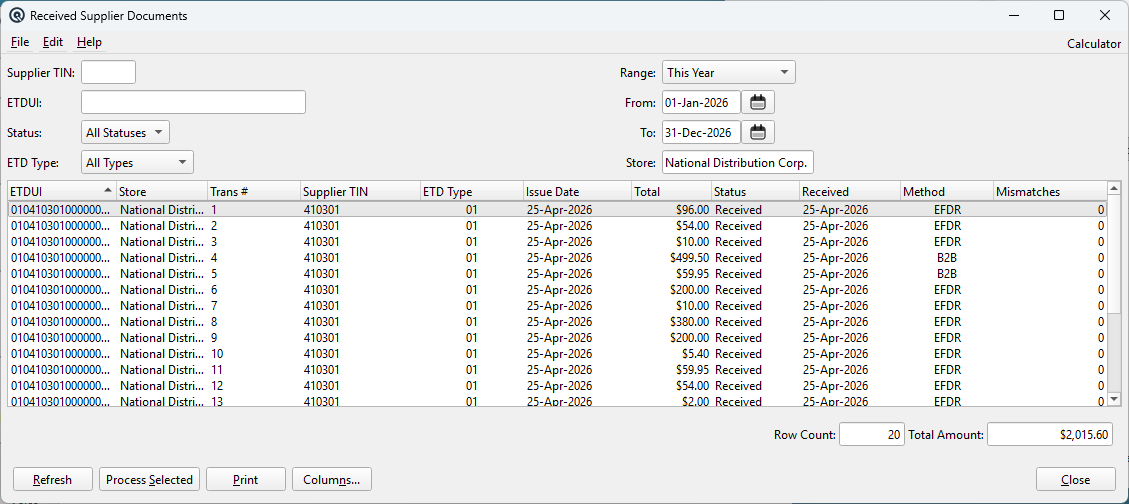
The Received Supplier Documents report displays inbound electronic tax documents (ETDs) received from vendors for reconciliation and processing. It queries the received_etd table and provides filtering by supplier, document type, status, date range, and store. Documents can be inspected, item-matched, and converted into Quasar Vendor Invoices (Receive transactions) directly from this screen. Access from Setup › Purchases › Received Supplier Docs.
Filter by document processing status:
• All Statuses — Show all documents
• Received — Document received but not yet processed
• Processed — Document has been converted to a Vendor Invoice
• Disputed — Document flagged for dispute
Tax Identification Number of the issuing supplier.
Supplier Name
Business name of the issuing supplier.
ETD Type
Document type code (01=Invoice, 02=Tax Receipt, 03=Debit Note, 04=Credit Note).
Issue Date
Date the supplier issued the document.
Total
Document total amount.
Currency
ISO currency code (e.g., PHP, USD).
Status
Processing status: Received, Processed, or Disputed.
Event Code
Client event code from the e-invoicing system.
Received
Date the document was received into Quasar.
Method
Delivery method code (how the document was received).
Mismatches
Count of line items with no product match. Uses a 3-tier matching strategy:
• Tier 1: vendor_item_map (vendor-specific item mapping)
• Tier 2: item_num (direct item number match)
• Tier 3: No match — counted as a mismatch
Returns -1 if the XML cannot be parsed.
Document List
The list of received supplier documents matching the current filters. Double-click any row to open the detail view.
Double-click any row to open the Received ETD Detail view, which shows the full document XML, resolved line items, and processing options.
Processes the selected document(s) by parsing the UBL XML, resolving line items, and opening a Vendor Invoice (ReceiveMaster) for each. Supports multi-select.
The Mismatches column uses a 3-tier resolution strategy to determine how many line items in the UBL XML document can be matched to Quasar inventory items:
Tier 1 — Vendor Item Map: Looks up the SellersItemIdentification/ID from the XML against the vendor_item_map table for the matched vendor (resolved by Supplier TIN).
Tier 2 — Direct Item Number: If Tier 1 fails, checks the item_num table for a direct match on the seller's item number.
Tier 3 — Mismatch: If both tiers fail, the line is counted as a mismatch, indicating manual mapping may be needed before processing.
If the BuyersItemIdentification is present but SellersItemIdentification is not, the buyer's ID is used as a fallback.