
More Topics
Time Clock Master
The Time Clock Master edits an individual time clock record. Managers can correct punch-in/out times, change the employee, or adjust the pay type. Access from the Time Clock List by clicking Edit.
|
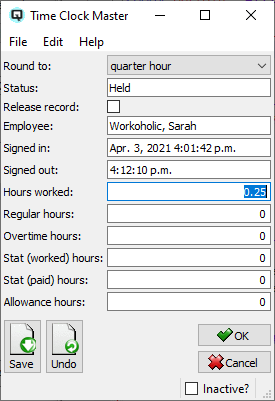
Fields
EmployeeThe employee this record belongs to. StoreThe store where the shift occurred. CustomerOptional customer associated with this time clock entry. Customer UnitOptional customer unit associated with this entry. Date InThe date the employee clocked in. Signed InThe time the employee clocked in. Date OutThe date the employee clocked out. Signed OutThe time the employee clocked out. Hours WorkedTotal hours worked for this entry, calculated from the in/out times. Regular HoursHours classified as regular pay. Overtime HoursHours classified as overtime pay. Stat (Worked) HoursStatutory holiday hours actually worked. Stat (Paid) HoursStatutory holiday hours paid. Allowance HoursAllowance hours for this entry. Round ToRounding option for the displayed hour totals: quarter hour, half hour, hour, or no rounding. StatusExport status of the record: Held (not released) or Billed (released for export). |
Related Screens
| Time Clock List | Time Clock | Employee Master |
| Quasar Accounting 7.1 • © Linux Canada Inc. • Table of Contents |