
Accounts & Ledger
Account Master
The Account Master creates or edits a General Ledger account. Each account has a name, number, type, and optional control settings. For a complete walkthrough of account setup, see the Quasar Guide. Access from Ledger › Chart of Accounts, then click New or Edit.
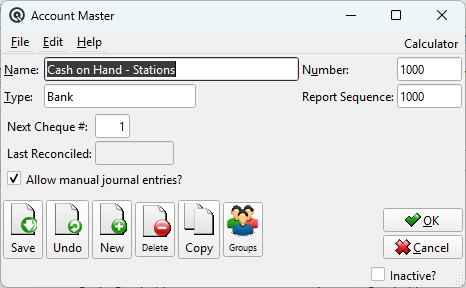
Fields
NameThe descriptive name for the account (e.g., "Cash in Bank", "Accounts Receivable", "Sales Revenue"). NumberA unique account number. Accounts are listed in number order on financial statements. Use a logical numbering scheme (e.g., 1xxx for Assets, 2xxx for Liabilities, 3xxx for Equity, 4xxx for Revenue, 5xxx for COGS, 6xxx for Expenses). Report SequenceControls the print order on financial statements. Normally the same as the account number, but can be overridden to change statement presentation order. TypeThe account type determines financial statement placement and normal debit/credit behavior. Select from your defined account types. Bank InformationAdditional settings for bank accounts. Next Cheque #For bank accounts, the next cheque number to assign. This auto-increments as cheques are printed. Last ReconciledThe date this account was last reconciled (for bank accounts). Updated automatically by the bank reconciliation screen. Allow manual journal entries?Check to allow manual journal entries to be posted directly to this account. Some accounts (like AR, AP, and Inventory control accounts) should be unchecked to prevent direct postings that would cause the sub-ledger to go out of balance. |
Toolbar Actions
Save / Undo / New / Delete / Copy / GroupsStandard master screen actions. OK / CancelSave and close, or discard and close. Inactive?Toggle to deactivate the account. Inactive accounts are hidden from lookups but preserve historical data. |
Related Screens
| Chart of Accounts | Account Type Master | Account Inquiry | Bank Reconciliation |
| Quasar Accounting 7.1 • © Linux Canada Inc. • Table of Contents |