
Setup & Configuration
Price Zone Master
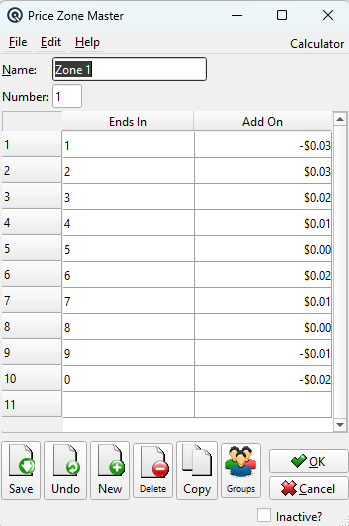
The Price Zone Master defines a pricing zone. Each store is linked to one price zone, and all regular selling prices are defined per zone. This allows different stores to sell the same item at different regular prices. Access from Setup › System › Price Zones, then click New or Edit.
|
General
NameThe descriptive name for this price zone (e.g., "Metro Stores", "Rural Stores"). NumberA unique number assigned to the zone. |
Rounding Table
|
The rounding table defines how prices ending in certain digits are rounded. Each row specifies a digit ending and what it should be rounded to. This is commonly used to enforce "charm pricing" (e.g., all prices ending in .99 or .95). Leave blank if no rounding rules are needed. Ending InThe digit(s) that the price currently ends in. Change ToThe digit(s) that the ending should be changed to. |
Toolbar Actions
SaveSave changes to the price zone. UndoDiscard unsaved changes. NewCreate a new price zone. DeleteDelete this price zone. CopyCopy this zone to create a new one with the same rounding rules. OK / CancelSave and close, or discard and close. |
Related Screens
| Price Zone List | Store Master | Price Batch Master |
| Quasar Accounting 7.1 • © Linux Canada Inc. • Table of Contents |