
Customers & Sales
Discount Master
The Discount Master creates or edits a discount definition. Supports line-level and transaction-level discounts with percentage or dollar amounts, date/time scheduling, and item limits.
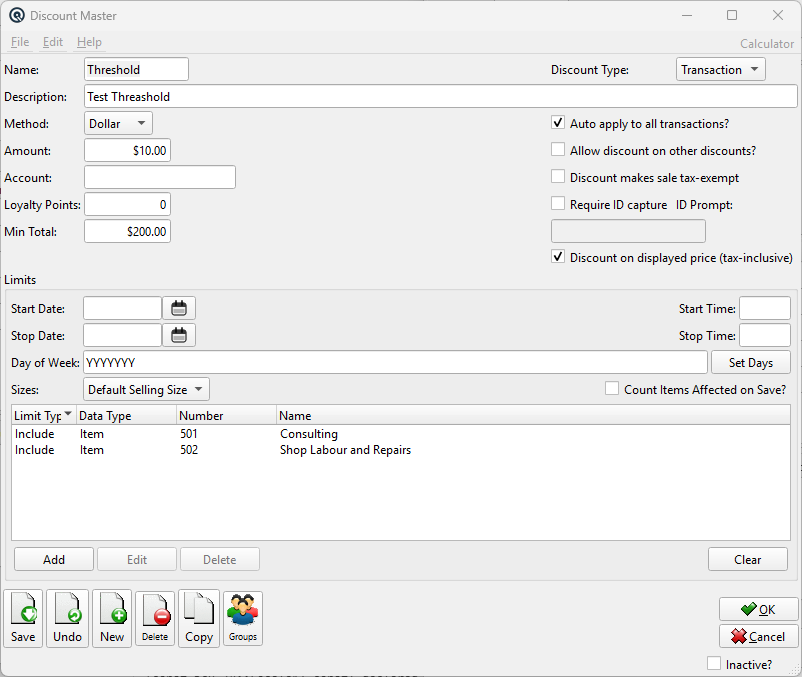
General
TypeLine (per item) or Transaction (whole sale). NameDiscount name. DescriptionExtended description of the discount. AccountOptional GL account for discount amounts. Only enter an account if you want to expense the discount like a markdown rather than affect the item's margin. When left blank, the discount reduces the item's revenue directly. Loyalty PointsThe number of loyalty points a customer must redeem to use this discount. When set to zero, the discount does not require loyalty points. MethodPercent or Dollar amount. AmountThe percentage or dollar value of the discount. Min TotalMinimum qualifying transaction total before this discount activates (transaction discounts only). Leave at zero for no threshold. |
Options
Auto ApplyWhen checked, the discount is automatically applied to qualifying transactions. Allow OtherWhen checked, the discount can be combined with other discounts. Tax Exempt on DiscountWhen checked, items receiving this discount become fully tax-exempt. Used for statutory discounts. Mutually exclusive with Discount Includes Tax. ID Capture RequiredWhen checked, the cashier must capture beneficiary ID information before applying the discount. ID PromptThe prompt text shown when ID capture is required (e.g. "Enter OSCA ID:"). Discount Includes TaxWhen checked, the discount is calculated on the tax-inclusive displayed price. Mutually exclusive with Tax Exempt on Discount. Verify Item CountWhen checked, the system warns if the discount applies to a large number of items. |
Schedule
Start DateFirst date the discount is active. Stop DateLast date the discount is active. Start TimeEarliest time of day the discount is active. Stop TimeLatest time of day the discount is active. Days of WeekWhich days the discount is valid. Use the Set Days button to choose days. Set DaysOpens a dialog to select the active days of the week. |
Item Limits
Size MethodControls whether the limit matches the default selling size, all selling sizes, or a custom size. SizeCustom size value used when Size Method is set to Custom Size. Limits TableLists the items, departments, subdepartments, brands, vendors, or groups the discount applies to. Use Add, Edit, Delete, and Clear to maintain the list. Limit ButtonsAdd — add a new limit. |
Toolbar
Save / Undo / New / Delete / Copy / GroupsStandard master screen toolbar actions. OK / CancelSave and close, or discard and close. Inactive?Toggle to deactivate the record. |
Related Screens
| Discount List | Invoice |
| Quasar Accounting 7.1 • © Linux Canada Inc. • Table of Contents |