
Layaway
Layaway Master
The Layaway Master is the central screen for managing an individual layaway. It displays the layaway's current status, financial summary, payment history, and amortization schedule. Layaways are created when a Sales Order with a Layaway Order Type is saved — the system automatically generates a layaway record linked to the order. Access from Sales › Layaway, from the Layaway List, or by double-clicking a layaway in the Receipt Master.
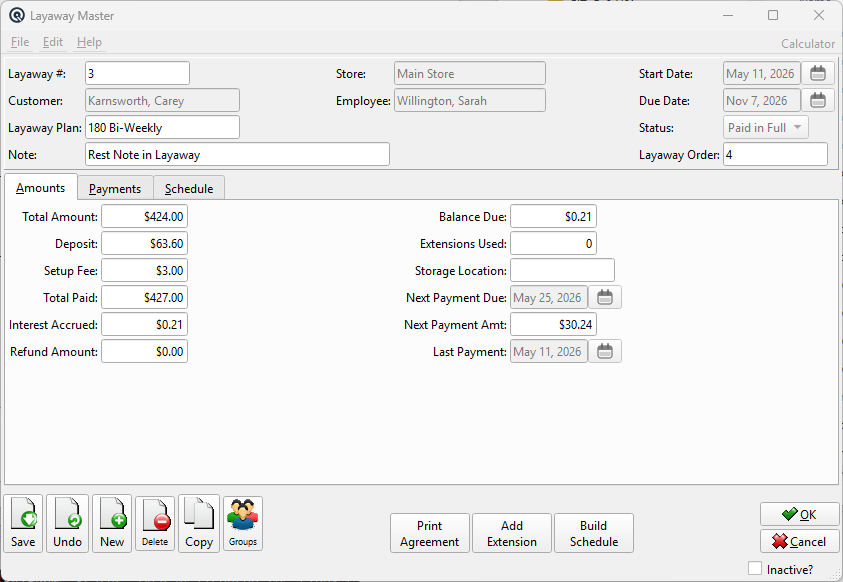
Header Fields
Layaway #Unique layaway number, auto-generated when the layaway is created. Read-only. CustomerThe customer for this layaway. The customer must have Can Layaway? enabled (see Customer Master). Read-only after creation — set from the originating sales order. Layaway PlanThe Layaway Plan governing this layaway's terms. Selecting a plan calculates the deposit, fee, due date, and payment schedule. Changing the plan recalculates all derived values. StoreThe store holding the layaway merchandise. Read-only, set from the originating order. EmployeeThe employee who created the layaway. Read-only. Start DateThe date the layaway was created. Read-only. Due DateThe final payment deadline, calculated as Start Date + Plan Duration. Extended when extensions are added. Read-only. StatusCurrent layaway status. Read-only, updated automatically by the system: Active — Layaway is in progress, payments being accepted. NoteFree-text note field (up to 60 characters) for internal comments about this layaway. Layaway OrderThe linked Sales Order number. Read-only. The sales order holds the actual merchandise line items. |
Tabs
AmountsFinancial summary of the layaway. PaymentsPayment history list. ScheduleAmortization schedule. |
Amounts Tab
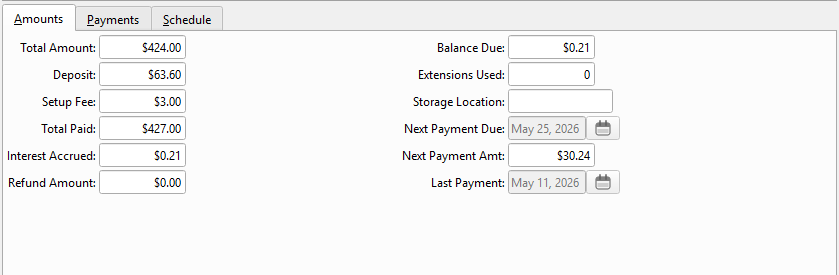
Total AmountThe total merchandise value from the linked sales order. Read-only. DepositThe initial deposit amount, calculated from the plan's deposit rules. Read-only. Setup FeeThe one-time setup fee from the plan. Read-only. Total PaidThe cumulative amount paid to date, including deposits and all subsequent payments. Read-only, calculated from the Interest AccruedTotal interest charged over the life of the layaway. Read-only. Refund AmountThe amount refunded to the customer on cancellation. Zero for active or completed layaways. Read-only. Balance DueThe remaining amount owed: Total Amount + Setup Fee + Interest − Total Paid. Read-only. Extensions UsedThe number of extensions applied to this layaway. Read-only. Storage LocationThe warehouse Location where the layaway merchandise is being stored. Editable — useful for tracking which shelf or area holds the reserved items. Next Payment DueThe date the next payment is expected, derived from the payment schedule. Read-only. Next Payment AmtThe expected next payment amount from the schedule. Read-only. Last PaymentThe date of the most recent payment received. Read-only. |
Payments Tab
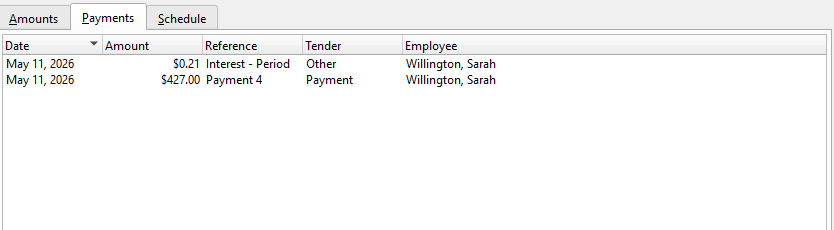
Payments ListLists all payments received for this layaway. Each row represents a payment transaction. Date — The date the payment was received. Double-click a payment row to open the corresponding Receipt for viewing. Prints a payment history report for this layaway. |
Schedule Tab
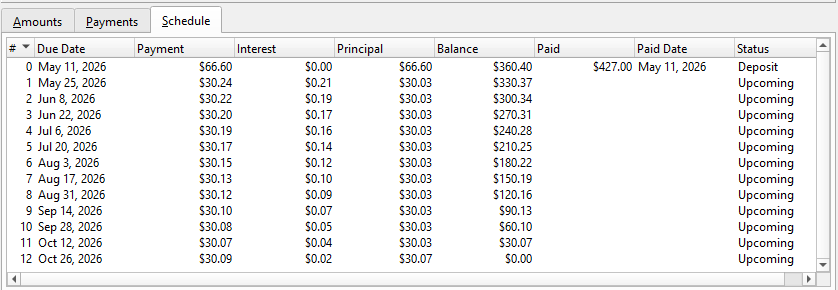
Schedule ListShows the amortization schedule for the layaway, breaking down each expected payment period. # — Payment period number. Prints the amortization schedule. |
Action Buttons
Print AgreementPrints a formal layaway agreement document using the Add ExtensionExtends the layaway's due date by the plan's extension days. Only visible when the layaway is Active and extensions are available. A confirmation dialog shows the extension details and fee (if applicable). The extension fee is recorded as a journal entry and added as a line item on the linked sales order. Build ScheduleGenerates or regenerates the amortization schedule based on the current plan terms. Saves the layaway first, then switches to the Schedule tab to display the result. Cancel LayawayCancels the layaway and processes the customer refund. Only visible when the layaway is Active. The cancellation workflow: 1. Calculates the refund: Total Paid − Setup Fee − Cancel Fee − Interest Charged. View OrderOpens the linked Sales Order so you can review or edit the merchandise line items (subject to layaway locking rules). Pay NowOpens the Receipt Master pre-filled for a layaway payment from this customer. The payment is recorded against this layaway's deposit liability account. |
Standard Buttons
SaveSaves the layaway record. DeleteDeletes the layaway. Only allowed if no payments have been made. Prints the layaway details. Inactive?Status bar checkbox. When checked, the layaway is marked inactive and will not appear in default lists. |
Related Screens
| Layaway List | Layaway Plan | Sales Order | Receipt | Customer |
| Quasar Accounting 7.1 • © Linux Canada Inc. • Table of Contents |