
Setup & Configuration
Station Master
The Station Master defines a workstation. Stations represent physical POS terminals or accounting workstations that process transactions. Each station belongs to a store and can have its own offline settings. Access from Setup › System › Stations, then click New or Edit.
|
General
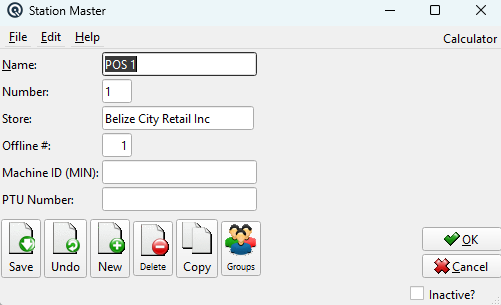
NameA descriptive name for the station (e.g., "POS Terminal 1", "Back Office"). NumberA unique number assigned to the station. StoreThe store this station belongs to. All transactions processed at this station are posted to this store. Offline #The number of offline transactions this station can process before it must reconnect to the server. Used for POS terminals that may temporarily lose network connectivity. Machine ID (MIN)The Machine Identification Number assigned to this station. In some jurisdictions, tax authorities require that each point-of-sale terminal be registered and issued a unique government identification number. All sales transactions processed at this station include the MIN on receipts and in electronic tax filings to allow the government to trace sales activity by terminal. PTU NumberThe Permit-to-Use number for this station. In jurisdictions that require POS terminal registration, the PTU is the authorization number issued by the tax authority granting permission to use this terminal for sales transactions. This number is printed on receipts alongside the MIN. |
Toolbar Actions
SaveSave changes to the station record. UndoDiscard unsaved changes. NewCreate a new station. DeleteDelete this station. CopyCopy this station to create a new one. OK / CancelSave and close, or discard and close. Inactive?Toggle to deactivate/reactivate the station. |
Related Screens
| Station List | Store Master | User Master |
| Quasar Accounting 7.1 • © Linux Canada Inc. • Table of Contents |