
Accounts & Ledger
Account List
The Account List displays all General Ledger accounts. Filter by account type or search text.
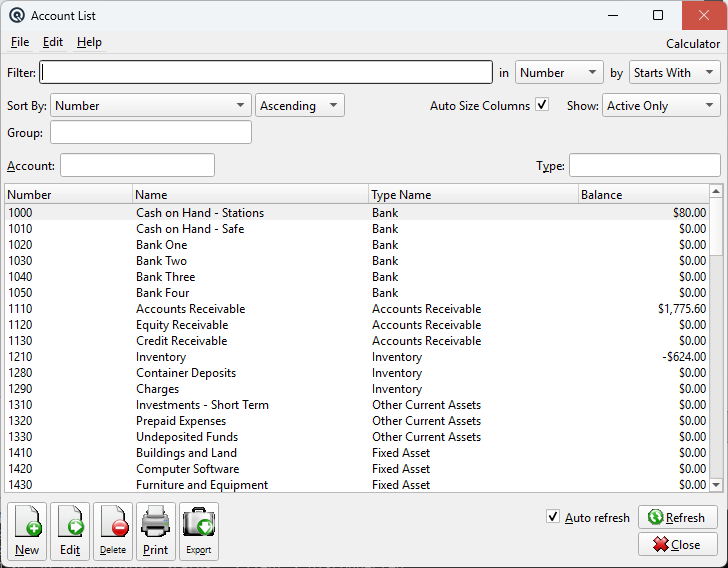
Filters
Account SearchSearch for accounts by number, name, or type. Enter text to filter the list. Account TypeFilter accounts by their type (Asset, Liability, Equity, Income, Expense, etc.). Select a type to show only accounts of that category. FilterQuick-search the displayed list. Type text to instantly filter rows by matching against the selected column. Find ColumnColumn to search within. Find MethodSearch method: Starts With, Contains, or Exact Match. Sort ColumnColumn to sort the list by. Sort MethodSort order: Ascending or Descending. Auto Size ColumnsWhen checked, columns auto-size to fit their contents. When unchecked, column widths are saved between sessions. ShowFilter by activity status: Active Only, Inactive Only, or Active & Inactive. GroupFilter the list by group. |
List
ListThe main list view showing all records. Double-click a row to edit. Right-click for options. NewCreate a new record. EditEdit the selected record. DeleteDelete the selected record. Print the list. ExportExport the list to a file. RefreshForce a refresh of the list data. CloseClose the list screen. |
Default Columns
| Column | Description |
| Number | GL account number. |
| Name | Account name. |
| Type Name | Account type (Asset, Liability, etc.). |
| Balance | Current account balance. |
Available Columns
Additional columns configurable via list settings, in alphabetical order.
| Column | Description |
| Last Reconciled | Date of last reconciliation. |
| Next Number | Next cheque/document number. |
| Report Sequence | Sort order for financial reports. |
Related Screens
| Account Master | General Journal |
| Quasar Accounting 7.1 • © Linux Canada Inc. • Table of Contents |