
Assets & Depreciation
Asset Type Master
The Asset Type Master creates or edits an asset classification. Asset types define default GL accounts and a depreciation method that are automatically inherited by any asset assigned to this type. If Is License? is checked, assets of this type will have the License tab enabled and the Warranty tab disabled. For a complete walkthrough, see the Quasar Guide — Assets and Depreciation. Access from Assets › Asset Types › New/Edit.
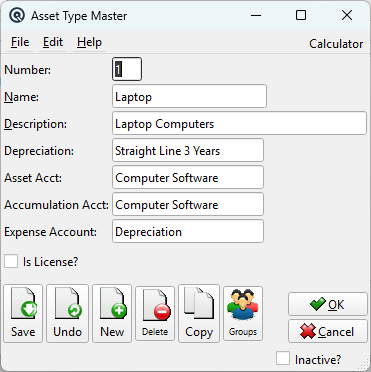
Fields
Is License?When checked, assets of this type are treated as software licenses. On the Asset Master, the License tab is enabled and the Warranty tab is disabled. NumberUnique type number (up to 5 characters). NameType name (up to 30 characters). Example: Furniture, Vehicles, Software Licenses. DescriptionExtended description (up to 50 characters). DepreciationDepreciation method (lookup). Links to a Depreciation record that defines the calculation type and useful life. Asset AcctDefault GL account for the asset's book value. Inherited by new assets of this type. Accumulation AcctDefault GL account for accumulated depreciation (contra-asset). Inherited by new assets of this type. Expense AccountDefault GL account for depreciation expense. Inherited by new assets of this type. InactiveToggle to deactivate the asset type. Inactive types do not appear in dropdowns or lists. |
Account Inheritance
|
When an asset type is selected on the Asset Master, the three GL accounts (Asset, Accumulation, Expense) and the depreciation method are automatically populated only if the asset's corresponding field is currently blank. Existing values are not overwritten. |
Related Screens
| Asset Type List | Depreciation Master | Asset Master |
| Quasar Accounting 7.1 • © Linux Canada Inc. • Table of Contents |