
Layaway
Sales Order Type
The Sales Order Type categorizes sales orders by their business purpose. Each type can carry a specific behavior that changes how the Sales Order screen operates. For example, a Layaway type restricts the customer lookup to layaway-eligible customers and generates a linked Layaway record when the order is saved. Access from Sales › Sales Order Type.
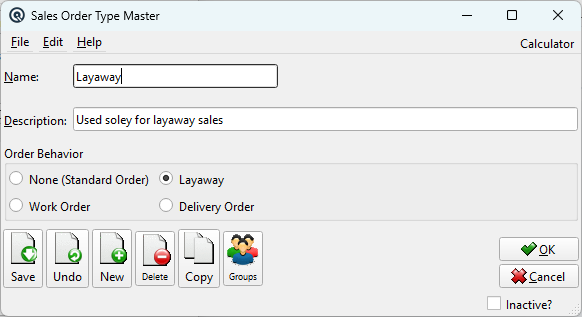
Fields
NameThe type name (up to 40 characters). Displayed in the Order Type dropdown on the Sales Order. DescriptionAn optional longer description (up to 100 characters) explaining the purpose of this type. |
Order Behavior
|
Each order type has exactly one behavior, selected via radio buttons: None (Standard Order)A regular sales order with no special behavior. The order follows the standard quote → order → invoice workflow. LayawayMarks orders of this type as layaway orders. When selected: • The customer lookup is filtered to show only customers with Can Layaway? enabled. Work OrderMarks orders as work orders for service/repair tracking. Reserved for future use. Delivery OrderMarks orders as delivery orders. Reserved for future use. |
Standard Buttons
SaveSaves the order type. DeleteDeletes the order type. Types in use by existing orders cannot be deleted. InactiveMarks the type as inactive. Inactive types do not appear in the Order Type dropdown. |
Related Screens
| Sales Order | Sales Order List | Layaway Master | Layaway Plan |
| Quasar Accounting 7.1 • © Linux Canada Inc. • Table of Contents |