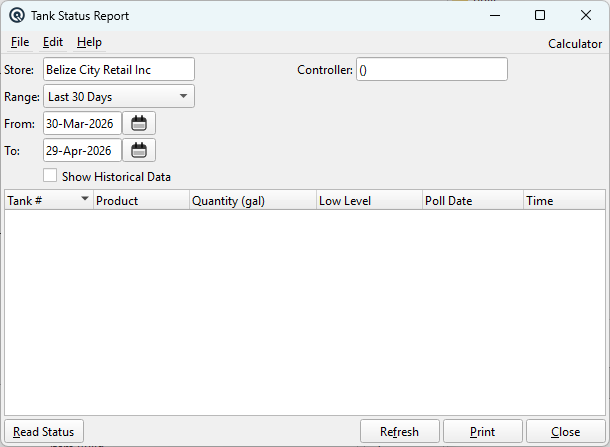
The Tank Status Report provides real-time and historical fuel tank inventory levels. It connects directly to a fuel site controller via TCP, sends a SHOW TANK command (FSC3000 protocol), parses the response, saves the readings to the database, and displays the results. This is the primary tool for monitoring tank levels, tracking fuel consumption trends, and detecting low-level conditions. Feature-gated to feat_fuel. Access from Setup › Sales › Tank Status Report.
Filter Fields
Field
Description
Store
Select the store to view. Defaults to the current store. Changing the store clears the controller selection and filters the controller lookup.
Controller
Select the fuel controller to query. Filtered to controllers assigned to the selected store.
Range
Pre-set date range for historical data. Defaults to “Last 30 Days”.
From
Start date for historical data filter.
To
End date for historical data filter.
Show Historical Data
When unchecked (default), only the most recent reading per tank is shown. When checked, all readings within the date range are displayed, enabling trend analysis.
Report Columns
Column
Description
Tank #
Physical tank number as reported by the controller.
Product
Fuel product name (e.g., Regular, Diesel, Premium).
Quantity (gal)
Current fuel volume in gallons.
Low Level
Low-level alarm threshold. Default is 500 gallons unless the controller reports otherwise.
Poll Date
Date when this reading was taken.
Time
Time when this reading was taken (HH:mm:ss).
Read Status (Live Polling)
The Read Status button initiates a live poll of the selected controller. The process:
1. Connects to the controller via TCP at the configured host and port
2. Authenticates using the configured password
3. Sends the SHOW TANK command (FSC3000 protocol)
4. Parses the tabular response to extract tank number, product, quantity, and level
5. Saves each tank reading to the tank_status database table with the current date/time
6. Refreshes the report to display the new data
A success message shows the number of tanks polled. Error messages are shown for connection failures, authentication errors, or unparseable responses.
Actions
Button
Description
Read Status
Live-polls the controller and saves new readings to the database.
Refresh
Re-queries the database for existing tank status records without polling the controller.
Print
Print the current report (reserved for future use).